Sorting, Filtering & Search
Every grid has three ways to narrow what you see: a sort on one column, a search across all columns, and a filter per column. They combine, and the database does the work — the browser never holds the whole entity.
Sorting
Click a column header to sort it. Clicking cycles through three states:
- First click — ascending (▲)
- Second click — descending (▼)
- Third click — no sort
Only one column sorts at a time. Derived columns cannot be sorted.
Codes and names sort by the number inside them
Sorting Code or Name reads the number the value carries, so the list reads the way you would read it out loud:
| Now | Before |
|---|---|
| CUST-1 | CUST-1 |
| CUST-2 | CUST-10 |
| CUST-10 | CUST-100 |
| CUST-100 | CUST-2 |
The letters still come first, so ORD- codes stay together after CUST- codes rather than being shuffled in among them by their numbers. Zaal 2 comes before Zaal 10. Leading zeroes make no difference: ST00002 sorts before ST00010. It works ascending and descending, and across pages — the whole entity is put in order before the page you are looking at is cut from it.
Two things worth knowing:
- Only the first run of digits counts. A code holding two separate numbers, such as
A1B2
against A1B10, is ordered as plain text, which is how every value was ordered before this existed. Nothing became worse; that case simply did not improve.
- Export and the reference dropdown are not affected. Both list records in the order they were
entered, whatever the grid is sorted by.
Every other column type sorts as it always did: numbers as numbers, dates as dates, text as text.
Global search
The search box in the toolbar searches every visible column at once. A column your role has set to None is not searched, so a match never leaks a hidden value.
Search matches what a cell displays, not how the value is stored. 31-01-2026, 99.95, Yes and a referenced record's label all work.
- With Full-Text Search installed, the search uses
CONTAINS()with prefix matching, soamstermatches Amsterdam - Several words are combined with AND:
west amsterdamneeds both - Without Full-Text Search it falls back to
LIKE— slower, but the same results
Column filters
The row under the column headers holds one filter box per column. Type what you see in the cell.
| Column type | What the box accepts |
|---|---|
| Text | Any substring, case-insensitive |
| Number | The number as displayed. A column with 2 decimals matches 99.95, not 99.950000 |
| Yes/No | The label the column displays — Yes, True, 1, or your own wording |
| Date | The date in the column's own format |
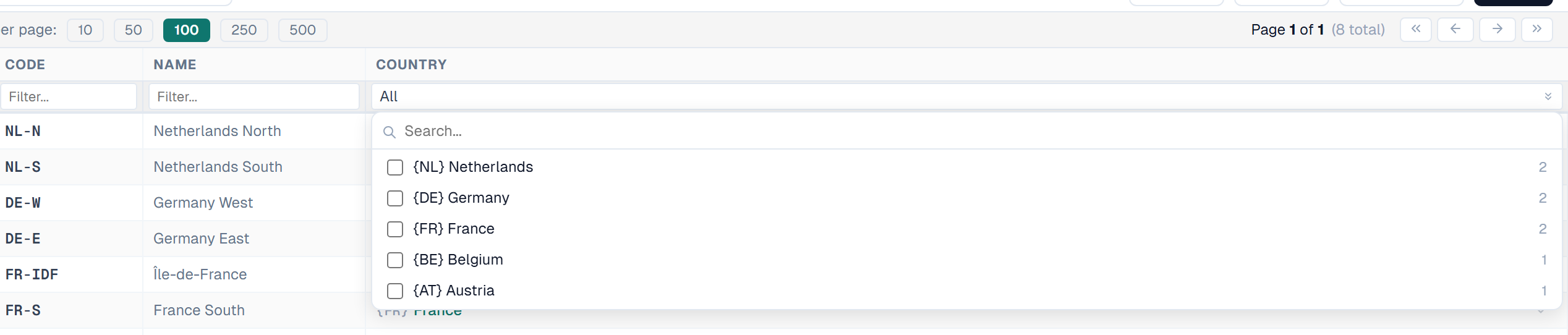
| Reference | A list of checkboxes. Several reference filters are combined with AND |
Filter boxes wait one second before firing, so a query does not run on every keystroke. Press Enter to apply at once. You can paste into a filter box.
Active filters are teal. The toolbar shows Clear N filters — click it to reset every filter on the entity.
The value list offers only what the column holds
Reference, number, Yes/No and date columns all share one rule: the list shows the values that really occur in that column, each with its record count, and adds (Blanks) only when some records have none.
This matters most on a reference column. A Branch pointing at Areas used to offer every Area in the model, including the ones nothing referenced, so you could pick a filter guaranteed to return nothing. It now offers the Areas in use, and says how many records each one has.
The counts describe the whole column, not the page on screen, and they ignore any other filter you have set. They load when you open the list, so opening a large entity is unaffected.
Filter a number column by value or range
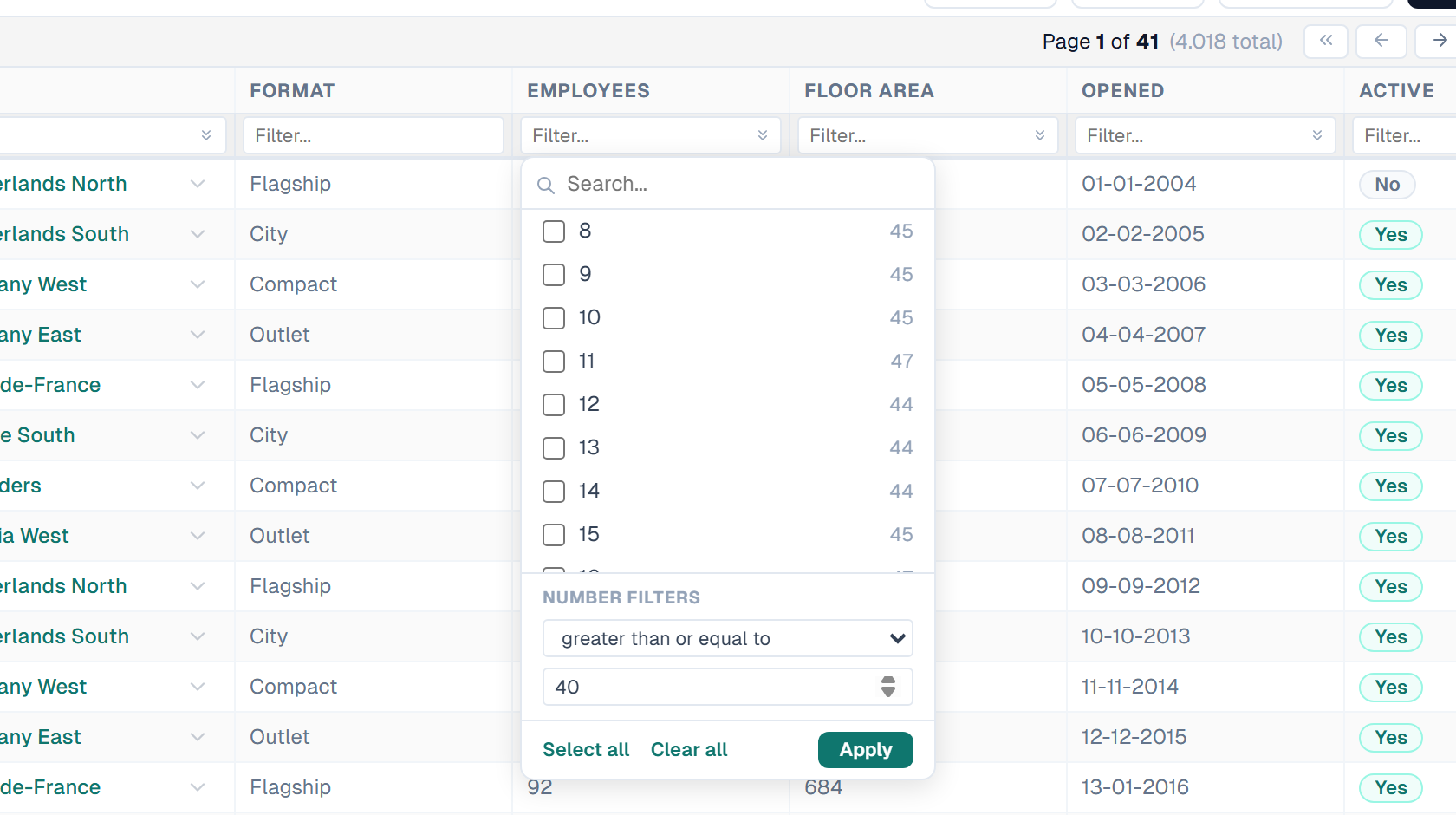
Number columns work like Excel's number filter. Click the chevron at the right of the filter box to open the panel.
The top half is the checkbox list of values with their counts, plus (Blanks). Tick any combination and click Apply.
The bottom half, Number filters, covers what a list cannot express:
| Operator | You get |
|---|---|
| equals | Exactly that value |
| does not equal | Everything except that value |
| greater than | Everything above the value |
| greater than or equal to | The value and everything above it |
| less than | Everything below the value |
| less than or equal to | The value and everything below it |
| between | Everything inside a span, both ends included |
Notes:
- The list and the operators are mutually exclusive, as in Excel. Choosing an operator clears the ticks; ticking a value clears the operator
- Records with no value are never matched by an operator. Use (Blanks) for those
- On a column with more distinct values than the list can usefully show, the panel says so and hides Select all. Use a comparison instead
- Select all takes what the list currently shows. With a search term active that means the matches only, and not the (Blanks) row, which the search hides
- A comparison value must fit the column: up to twelve digits before the decimal point and six after. A longer number is refused with Number is too large to filter on
- Yes/No columns get the list only — two values need no range
Filter a date column by year and month
Date columns get a tree of the years and months that actually occur in the column, next to the text box.
- Click the chevron at the right of the date column's filter box.
- Tick any combination of months. Each shows how many records fall in it.
- Tick a year to take all of its months at once. A partly selected year shows a dash.
- Click Apply.
Notes:
- The tree is built from the column's real values, so an empty month is never offered
- It loads when you open the filter, not when the grid loads
- Select all and Clear all act on everything currently visible
- The search box narrows the tree. Type
Mayfor one month, or2026to keep a whole year
Partial dates work in the text box
Because the filter matches the displayed date, a partial value selects a range without opening the tree:
| You type | You get |
|---|---|
31-01-2026 | That single day |
01-2026 | All of January 2026 |
2026 | The whole year |
The format follows the column's own Date format, so a column configured as YYYY-MM-DD is filtered as 2026-01-31. If the format carries a time, that is matched too: type 14:30 to find every record at that time.
How filters combine
- The first active filter — global search, name or code — selects the matching rows directly. The whole dataset is never loaded into memory
- Remaining filters narrow that result by successive elimination
- Reference filters are applied last, as exact-match lookups
For measured response times on large entities, see Performance.
Related
- Grid Overview — where the search box and the filter reset live
- Selection & Bulk Operations — act on the rows a filter leaves behind
- Performance — benchmarks and what affects them
- Date & Time Formats — the format a date column is filtered in
- Install SQL Server — installing Full-Text Search