Licensing
Primentra runs on a licence key. Without one it starts a 60-day trial. This page covers both.
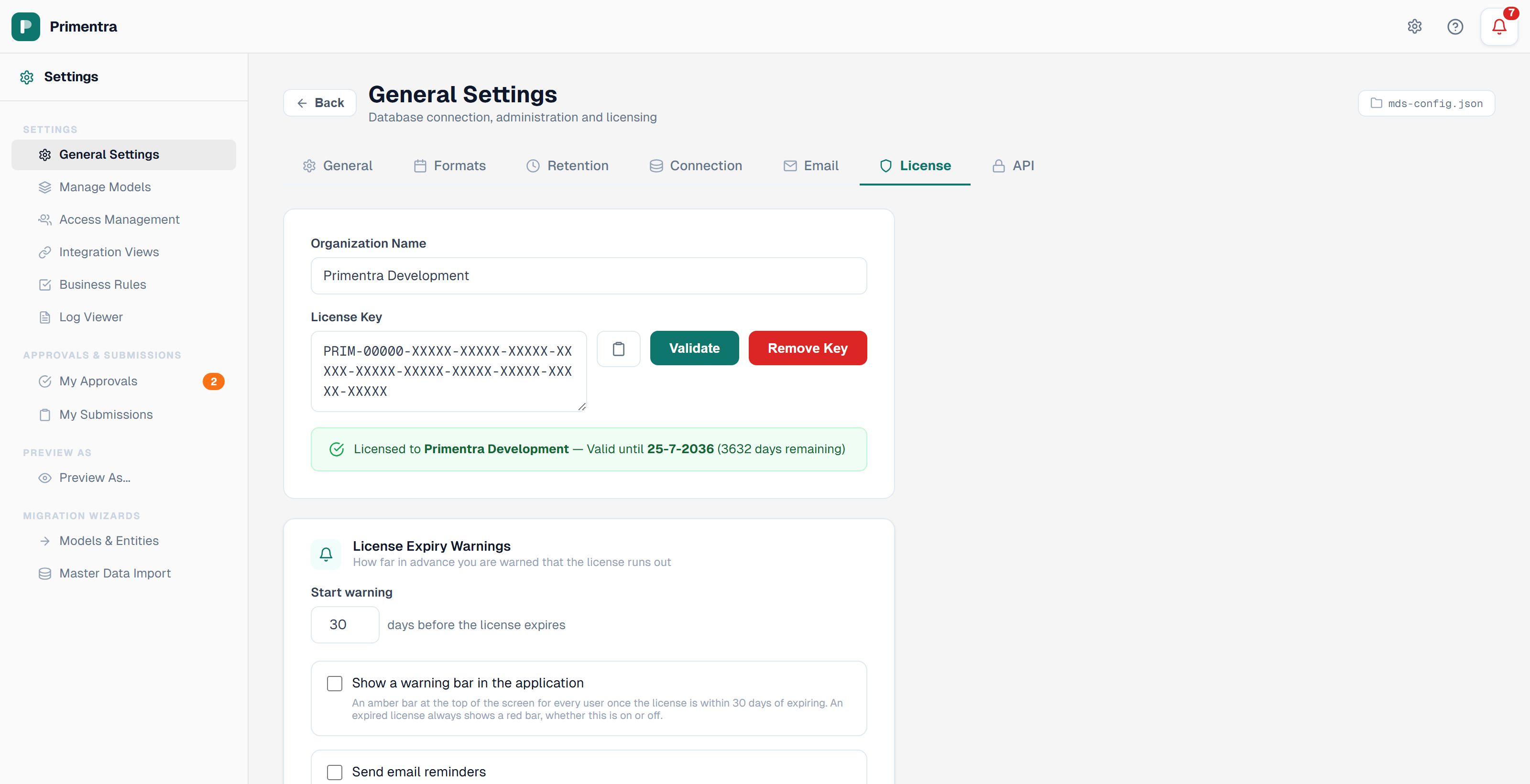
Access: Settings → General Settings → License
The trial
A new installation with no licence key activates a trial automatically.
- The trial runs for 60 days.
- The remaining days show on the License tab and in the status bar.
- In the last 10 days an orange bar appears at the top of the application.
- When it expires, a red bar reads *Trial expired — Application is in read-only mode*.
The trial is tied to the machine, not to the database. Reinstalling Primentra or recreating the database does not restart it.
Entering a licence key
- Open Settings → General Settings → License.
- Type the Organization Name exactly as it was supplied.
- Paste the License Key into the key box, or use the clipboard button next to it.
- Click Validate.
- Click Save settings.
On success the panel reads *Licensed to* your organization name, *Valid until* the expiry date, with the days remaining. On failure it reports why.
Click Remove Key to clear the key and the organization name and save immediately.
Key format
Keys start with PRIM- followed by 22 groups of five characters, 136 characters in total. They are long because the signature cannot be shortened, so paste them rather than typing. Leading zeros in the first group are normal. The field accepts lower case and converts it.
PRIM- plus four groups of five) are rejected with *Invalid license key format*. Request a replacement key before you upgrade a licensed installation. See Upgrading.Expiry warnings
The License Expiry Warnings card sets how far in advance you are told the licence runs out.
| Setting | Effect |
|---|---|
| Start warning | How many days before expiry the warnings begin. 1 to 365, default 30 |
| Show a warning bar in the application | An amber bar for every user once the licence is inside that window |
| Send email reminders | Email to the recipients below, on the same window |
| Repeat every | How often a reminder is resent: Daily, 2 days, 3 days, Weekly, Bi-weekly, or a custom 1–365 days |
| Recipients | Comma-separated email addresses |
An expired licence always shows a red bar, whether the warning bar is switched on or not.
What happens without a valid licence
The License tab reports *No active license — read-only mode*, and the red bar at the top of the application carries an Activate license button that opens this tab.
Licence scope
A Primentra licence is per production server, not per company.
One licence covers:
- One production server or installation.
- Any number of non-production environments — development, test, UAT — in the same organization.
An extra licence is needed for:
- Each additional production server. Separate EMEA and APAC production servers need one licence each.
There are no per-seat fees and no limit on users, models or data volume. The only boundary is the number of production servers.
Related
- Email & Notifications — the SMTP server the reminders need
- General Settings — the other settings tabs
- Upgrading — request a new key before you upgrade
- Install Primentra — where the licence is first entered