Match and merge for your master data
Lookalikes finds records that are the same thing typed in different ways, such as Hartog Industrial Supplies and Hartog Industrial Supplies B.V. You review each group and merge it into one record.
Part of Primentra since version 1.2026.11.6, at no extra cost. It runs on your own SQL Server.
A unique rule cannot see these
A unique rule stops two records with the same value. These three records all get past it, and a person sees one supplier.
| Code | Name | City | VAT number |
|---|---|---|---|
| SUP-1001 | Hartog Industrial Supplies | Rotterdam | NL812345678B01 |
| SUP-1002 | Hartog Industrial Supplies B.V. | Rotterdam | NL812345678B01 |
| SUP-1003 | Hartog Industrial Suplies | Rotterdam | (empty) |
Lookalikes cleans a copy of each value first: lower case, no accents, no punctuation, no legal form such as B.V. or GmbH. Then it scores each pair from 0 to 100 and puts the three records in one group. The stored values do not change.
The idea in a few minutes
Press Play for the spoken version. It takes two records through one rule, and shows when the rule says no.
Two records. Two histories. Two different answers to the same question.
How it works
An administrator sets up a rule per entity. Data stewards work the queue.
Choose the columns to compare, and how: exact, normalized, or with typos allowed. A column such as the VAT number can be a must; the city can be extra proof. Templates for companies, people, addresses and products give you a start, and Test these rules shows what the rule finds before you save it.
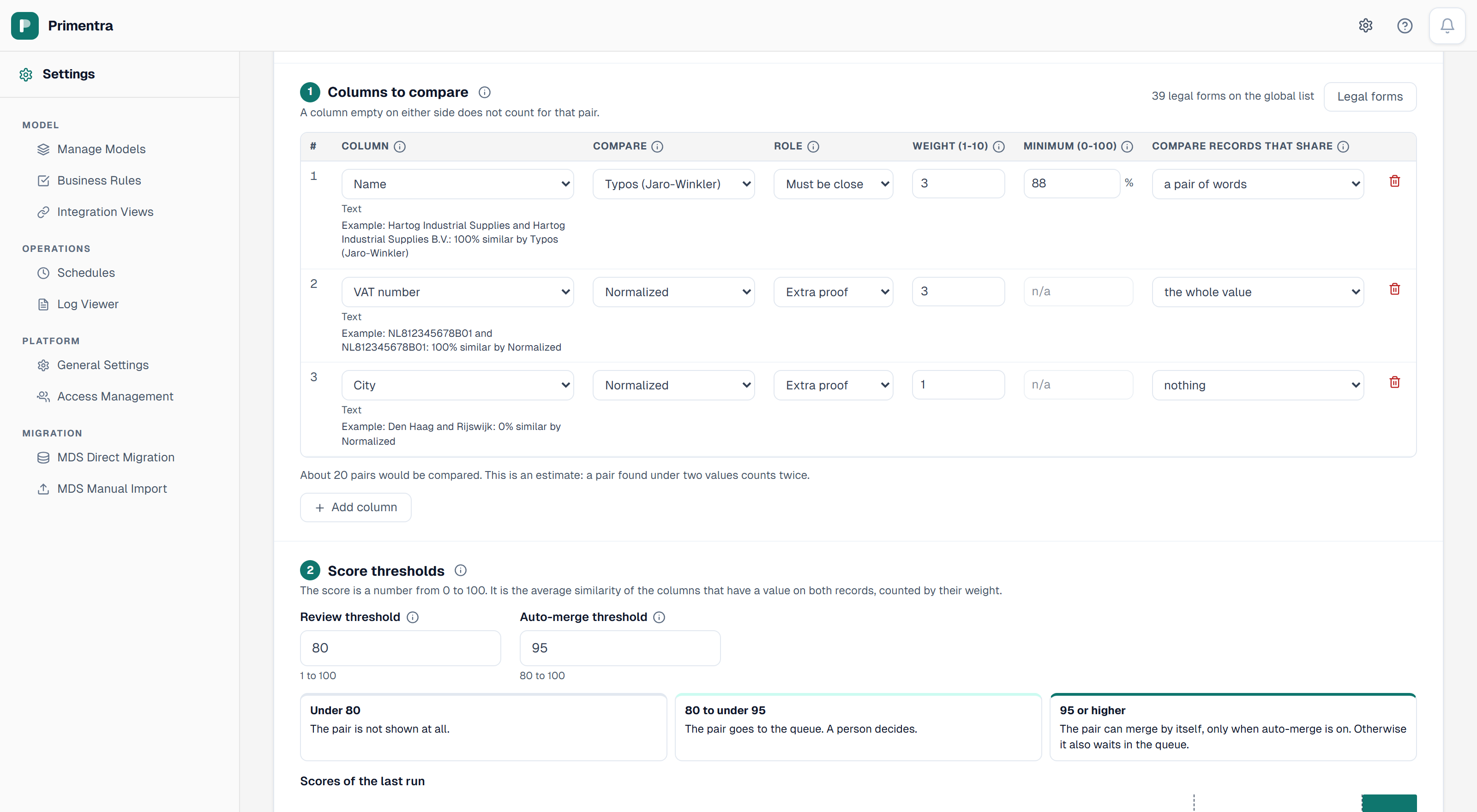
Click a screenshot to enlarge it.
You decide what merges
- A run only finds lookalikes. No record changes until a person merges.
- Auto-merge is off by default. Switched on, it merges a group only when every pair in it reaches your threshold, and at most 100 groups per run unless you set another number.
- On an entity that needs approval, auto-merge sends a merge request, and an approver decides.
- A Merge right per role and entity decides who may merge and unmerge.
- While someone types a new record in the grid, a hint shows the records it looks like.
- The REST API can find lookalikes, merge and unmerge, up to 1,000 records in one call.
What it does not do
- It matches records inside one entity. It does not link records across source systems or across entities.
- It does not write back to another MDM or to a source system.
- It finds pairs with the rules you set. It does not train itself on your data.
AI assist, if you want it
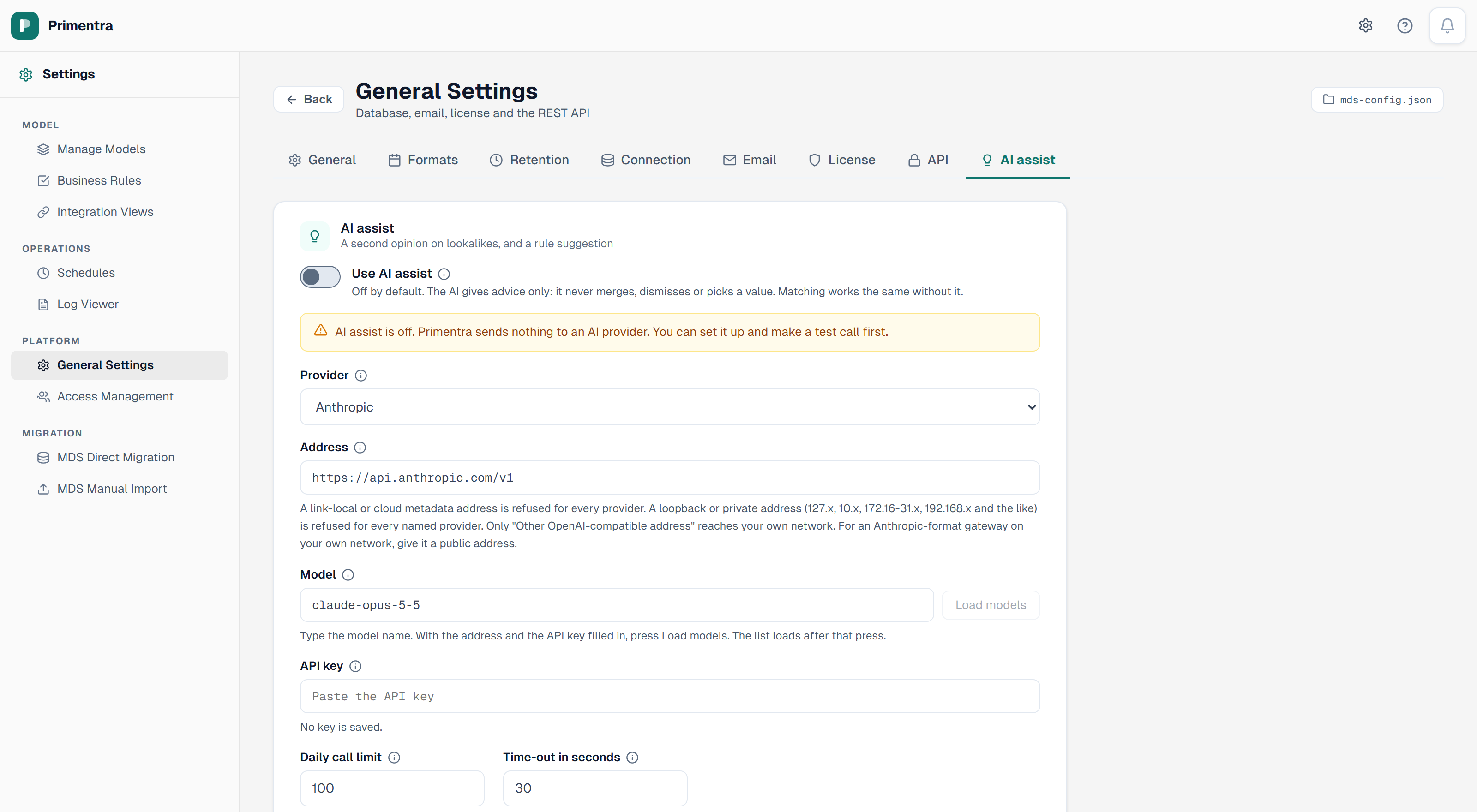
AI assist gives a second opinion on a group and can draft a rule for you. It is off by default and gives advice only. It never merges, dismisses or picks a value, and Lookalikes works the same without it.
- Your own provider and key: Anthropic, OpenAI, Azure OpenAI, Google Gemini, xAI Grok, Azure AI Foundry, or a model server on your own network.
- A second opinion sends the compared columns of one group, up to 10 records. A rule draft sends up to 50 example values from the columns you select, and you read the whole request before anything leaves. A column with the permission None never goes.
- You can give it your own rules per entity, for example: the same VAT number means the same company.
- A daily call limit applies, and the Log Viewer lists every call.
The provider processes the fields Primentra sends, under your own agreement with that provider. You pay the provider for the calls.
Try it on your own list
Load a supplier or customer list into a test entity and run Lookalikes on it. The 60-day trial includes it.