
The short answer
When a child row comes before its parent in the file, the parent does not exist yet at the moment the import writes the child. A plain import refuses the child. Primentra writes every row of the load first and links the parents after, in one transaction, so the row order of your file does not matter. A parent code that matches nothing still gets its row refused, along with every row below it.
HR sends the employee list as a spreadsheet, sorted by surname. Chris is on row 3. Bram, his manager, is on row 41. You import the file, and Chris comes back refused: the Manager column points at a record that does not exist. Bram does exist. He sits 38 rows further down.
Your file is fine. People sort a file to read it, and an import reads it from the top. Most trees in master data have this shape: an employee and a manager, a cost center and its parent, a product category inside another category. One column points back at its own entity, and the rows almost never arrive parents first.
Why the row order matters
An import checks each reference when it writes the row. You want that check, because it stops a code that points at nothing. In SQL Server you know it as a foreign key. In Primentra it is a domain attribute, and its value must match a code in its source entity.
With two entities you can pick an order. Load Countries, then Customers. The model import sorts the entities for you. An entity that points at itself has no such order. Parents and children share one file, and the only safe order is the tree itself, from the top down.
Three workarounds, and what they cost
Sort the file parents first
This holds until somebody opens the file in Excel and sorts it by name again. To sort by depth you need the depth of each row, and you only get that by walking the tree, which is the thing you are trying to load. Two people who report to each other have no top at all, so no sort order exists for them.
Load the file twice
Load every row with the parent column empty, then run a second load that fills it in. Most data teams reach for this first. Between the two loads the tree is flat, and a report that runs in that gap counts every employee as the top of the company. If the parent column is required, the first load refuses every row.
Switch the foreign key off
Disable the constraint, load, enable it again. Enable it with a plain ALTER TABLE ... CHECK CONSTRAINT and SQL Server does not look at the rows you loaded. It marks the constraint as not trusted. Every code that pointed at nothing now sits in your table, and nothing tells you which rows they are.
Rows first, links after
Primentra loads an entity that points at itself in two steps, inside one transaction. First it writes every row with the parent empty. Then it reads each parent code and links it to a row in the database or to a row of the same load. If either step fails, SQL Server rolls back both, so no report ever sees half a tree.
Take three rows of that HR file. Chris comes first, and Anna, at the top of the tree, comes last:
Code,Name,Manager
E3,Chris,E2
E2,Bram,E1
E1,Anna,
Import it into Employees and the result screen reads Inserted 3. In the grid, Chris has the manager {E2} Bram and Bram has {E1} Anna. Rows that are already in the database count too. Bram can point at an Anna you loaded last year while Chris points at a Bram from this file.
Pasting into the grid works the same way. The preview shows each link before you save anything:
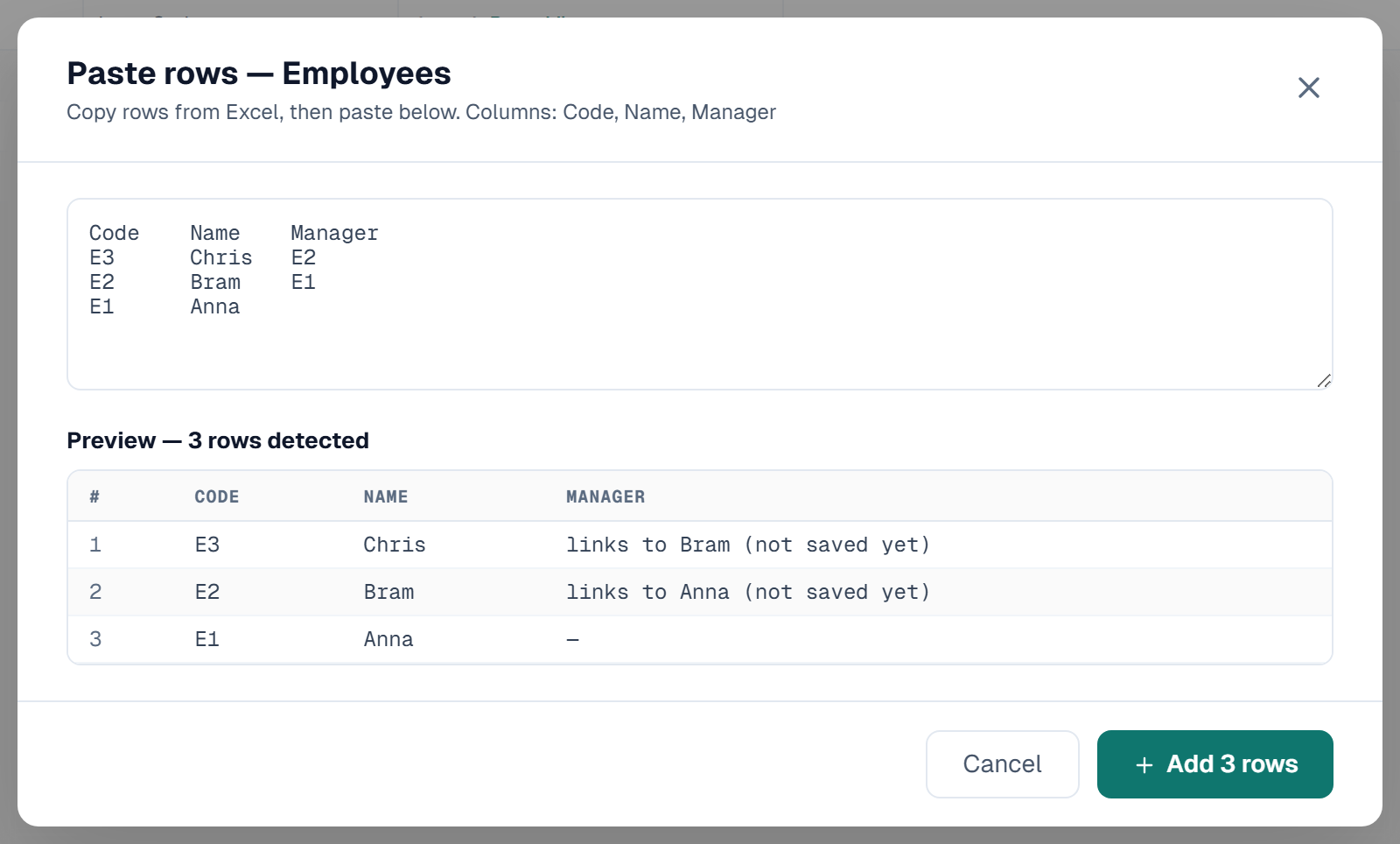
Mark Manager as required and the person at the top needs a value too. Point Anna at herself with E1,Anna,E1. A link to her own row counts as a value. Domain Sources & Links walks through each case with its file.
A parent code that matches nobody
Loading the rows first does not mean Primentra takes anything you give it. Add two rows to the file. Dirk, code E4, reports to E9, and no row has that code. Eva, code E5, reports to Dirk.
Primentra checks the file against the database before it writes. It refuses Dirk with this reason:
"Manager" refers to "E9", which matches no record in the linked entity
Then it refuses Eva, because her manager will never load:
"Manager" refers to "E4", a row of this file that was refused
It follows the chain down to the last row, so no row ends up pointing at a manager who was refused. By default one refused row stops the whole import and writes nothing. Select Import the other rows anyway and the rest of the file loads. Dirk and Eva then sit in a reject list you can download, fix and import again.
Primentra does let one case through: a loop. If Anna reports to Bram and Bram reports to Anna, both rows load, each linked to the other. If a loop is always a mistake in your data, check for one after the load.
Where it works, and where it does not
The two steps run wherever Primentra loads many rows at once:
- The Excel and CSV import.
- Pasted rows, and new rows you type in the grid. The Manager list of a new row offers
Anna (not saved yet). - The model import, and the MDS data migration, which loads a Cost Center or Org Unit tree in one pass. Our post on migrating MDS hierarchies covers the model side.
- A staging batch. A row that points at a refused row of the batch gets error code
8192.
Two places cannot do it. The REST API takes one record per call and wants the row id of the target, so create the parent first. And on an entity with approval, a grid save cannot link to a row that is not saved yet. Submit and approve the parent, then the children.
Common questions
Does the row order of my file matter for a parent-child hierarchy?
Not in Primentra. For an entity that points at itself, it writes every row first and links the parents after, in one transaction. A child can come before its parent.
What happens if a parent code matches no row?
Primentra refuses that row and every row below it in the chain, with a reason for each. Select Import the other rows anyway to load the rest of the file.
Can I load a hierarchy through the REST API in one call?
No. The REST API takes one record per call and needs the row id of the parent, so create parents before children. Use the file import or a staging batch for a whole tree.
Does the MDS migration handle recursive hierarchies?
Yes. The MDS data wizard loads an entity that points at itself, such as Cost Center or Org Unit, in one pass and in any row order.
Got a hierarchy file another tool refused? Load it into the 60-day trial on your own SQL Server and see which rows come back, and why.