Domain Attributes & Hierarchies
Domain attributes are the backbone of Primentra's relational model. They link one entity's field to another entity's records, and the links between entities are what a hierarchy is made of.
How a domain attribute works
Watch it done in 80 seconds — a Store entity gets a Main supplier lookup, and a value is picked and saved in the grid:
Set an attribute's Type to Domain, then pick the target entity in the Length/Target column. In the data grid the field becomes a dropdown of records from that entity. Users pick a value instead of typing one, so a reference is always valid.
Domain values always read as {Code} Name — for example {NL} Netherlands. The same format is used when you copy, paste and export. On import, a value is matched by Code, by Name, or by the combined {Code} Name form.
Build a hierarchy
Chain domain attributes to build a multi-level hierarchy:
- Costcenter has a domain attribute pointing at Area
- Area has a domain attribute pointing at Zone
- Zone has a domain attribute pointing at Country
That is the chain Costcenter → Area → Zone → Country.
Primentra detects these chains and draws the hierarchy under each model. There is nothing separate to configure — the hierarchy is read straight from the attributes.
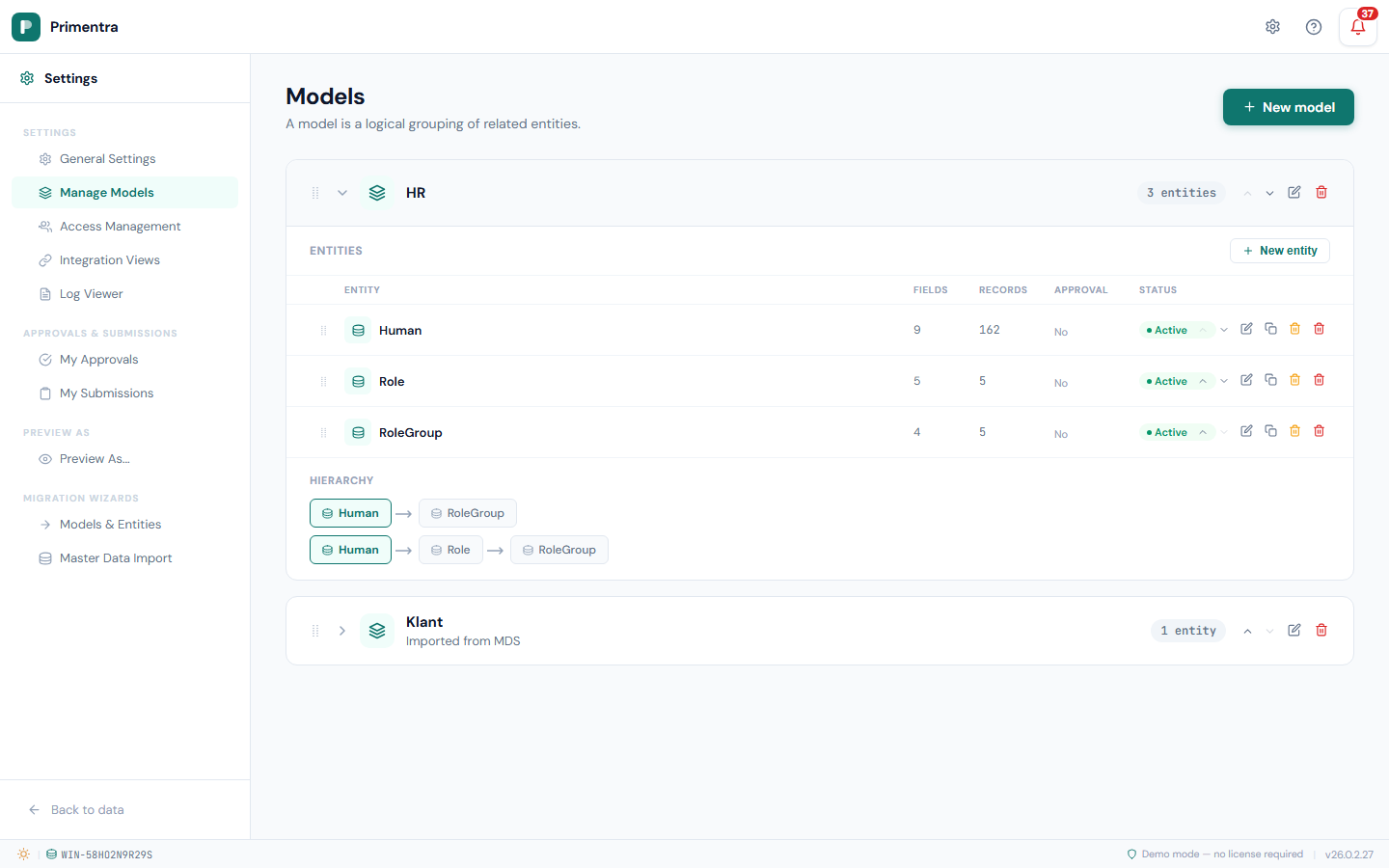
To see every model's chains on one screen, use the All hierarchies panel on the Models page — see Models.
Cascading dropdowns
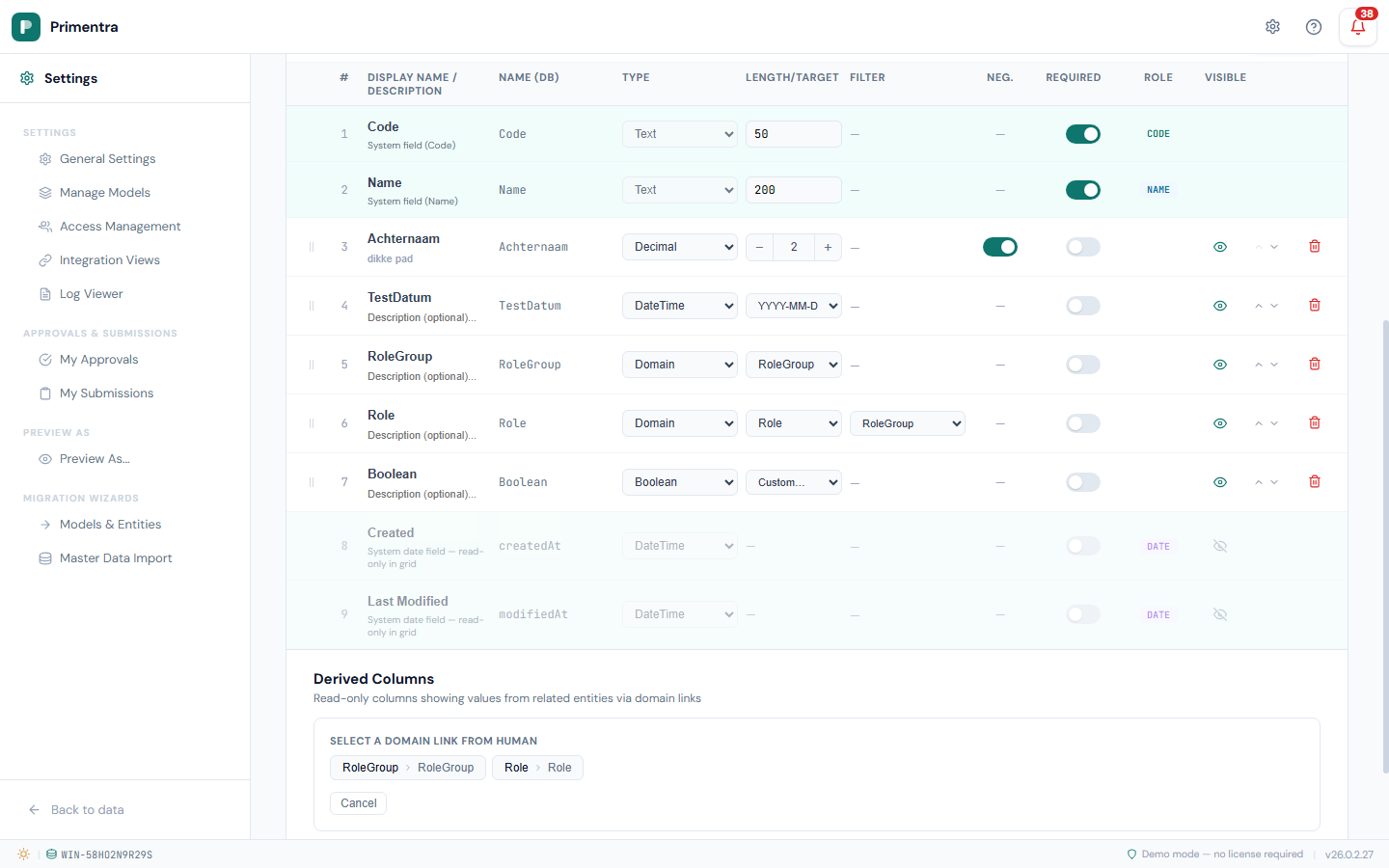
When one entity has two related domain attributes — a RoleGroup and a Role — you can narrow the Role dropdown to the group that is selected. This is the Filter column, also called a parent filter.
Without it, the Role dropdown always offers every role. With it, only the roles that belong to the selected group are offered, so an inconsistent combination cannot be picked.
Set it up
- Go to Settings → Models, open the entity and click Edit.
- Find the child domain attribute in the list — the one to be narrowed, for example Role.
- In the Filter column, select the parent domain attribute, for example RoleGroup.
- Click Save.
What "matching" means
The child entity must itself carry a domain attribute pointing at the same entity as the parent. Primentra resolves the options through that relationship: select "Management" as the RoleGroup and the Role dropdown offers only roles whose own RoleGroup is "Management".
In the data grid
- Select a value in the parent and the child dropdown narrows at once.
- Clear the parent and the child offers everything again.
- Change the parent to another value and the child is cleared, so no stale combination survives.
Filtering also works in reverse. Fill the child first and Primentra fills the parent with the matching value. Users can start from whichever field they know.
Example — roles filtered by role group. Entity Human, with RoleGroup pointing at the RoleGroup entity and Role pointing at the Role entity. Role itself carries a RoleGroup attribute. Set Role's Filter to RoleGroup:
- Selecting "Management" as the RoleGroup narrows Role to management roles.
- Selecting "Accountant" as the Role fills RoleGroup with "Finance" automatically.
Rules
- Loop prevention — A can filter B, but B cannot then filter A. The Filter dropdown only offers sibling domain attributes that do not form a loop.
- Chains — A filters B and B filters C is allowed. Configure one link at a time: set B's filter to A, then C's filter to B.
Parent-child inside one entity
An entity can point a domain attribute at itself. That is how you build a parent-child tree, and the Filter column narrows the parent list the same way it narrows any other.
Take a Klantstructuur entity with Code and Name plus two domain attributes:
| Attribute | Points at | Filter |
|---|---|---|
Concern | Concern entity | — |
ParentStructuur | Klantstructuur (itself) | Concern |
Set it up in three steps:
- Create the entity with its
Concernattribute. - Add
ParentStructuuras a domain attribute and pick the same entity as its target. - Set
ParentStructuur's Filter toConcernand save.
On a row in concern *Alpha*, the Parent structuur dropdown offers only structures that are themselves in *Alpha*. A parent-child link can never cross a concern boundary.
Shared entities across models
By default a domain attribute can only point at entities in the same model. Turn on Shared across models on an entity to make it available as a domain target from any model.
Use it for reference data that the whole organization needs — Country, Currency, status codes.
- Go to Settings → Models and open the entity you want to share.
- Turn on the Shared across models toggle.
- Click Save.
The entity then appears in the target dropdown in every model, with its source model in brackets so you can tell it apart.
- Sharing does not copy the data. It stays in its original model.
- Permissions still apply. Users need at least Read access to see the values.
- Microsoft MDS has no equivalent — cross-model references are Primentra only.
Related
- Attributes & Data Types — every other attribute type
- Models — the All hierarchies panel across every model
- Derived Columns — pull a value along one of these chains
- Integration Views — where a rename shows up as drift