Role: Approver
An approver decides on the requests for the entities they are assigned to. You are an approver when your role has the Approver flag and you are on the entity's approver list.
Watch the other half of the workflow in about seven minutes — sending a request back, requiring every approver to agree, forcing a request through, and what happens when the data moves before a decision is made:
The queue
Settings → My Approvals (/admin/approvals) shows every pending request you may decide on, oldest first. The tab carries a count badge. An administrator sees all pending requests, for every entity.
The filter bar above the table holds a search box (entity or submitter), a status dropdown, the change-type chips + New, ~ Edit and − Del, and a date range. Every column header sorts.
The review panel
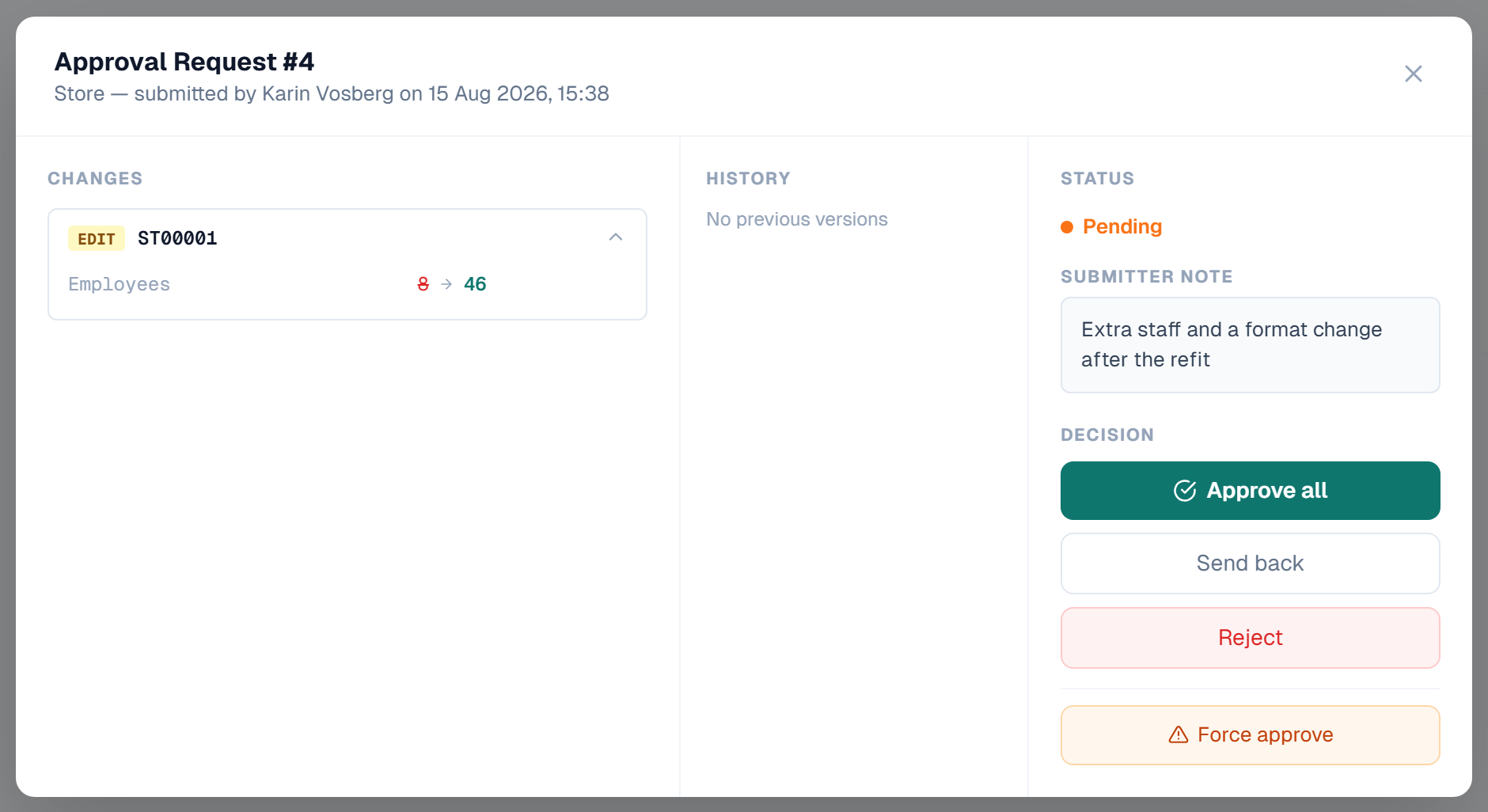
Click a request to open it. The panel has three columns.
Changes — one collapsible row per record, with a NEW, EDIT or DEL badge and the record code. Expand a row to see the fields:
- A new record lists every submitted value.
- An edit lists only the fields that changed, as old value → new value.
- A deletion lists the values that will be removed.
History — earlier versions of this request, when there are any.
Status — the current status, the submitter's note, the full review history with comments, and the decision buttons.
Making a decision
| Action | Use it when | Effect |
|---|---|---|
| Approve all | The changes are correct | Every record in the request is written to the master data |
| Send back | The change is right in principle but needs a fix | The request returns to the submitter for revision. The records are unlocked |
| Reject | The change must not proceed at all | The request is closed for good. The records are unlocked |
Send back and Reject need a reason. The button stays disabled until you type one. The reason is stored in the review history and sent to the submitter by email.
After the decision you get a confirmation banner and a toast at the bottom of the screen:
- Approved (green) — all changes have been applied to the master data
- Vote recorded (blue) — your vote is in, other approvers still have to decide
- Force approved (orange) — an administrator override, see Role: Administrator
When all approvers must agree
If the entity uses the All approvers must agree strategy, the panel shows the vote count: *"2 of 3 approvers have approved — all must agree."* After your vote the button reads Already approved and is disabled, and the line changes to how many approvers are still needed. The last required vote applies every change at once.
What can stop an approval
- A business rule — an error-severity rule failure rolls the whole approval back. The panel shows which rule failed, on which attribute. See Rules in Approval Workflows.
- A duplicate code — a new record whose code already exists is refused and marked rejected. The other records in the request are still applied.
- No approvers assigned — the entity is misconfigured. See Configuring Approvers.
- Your own submission — refused unless the entity allows self-approval.
Deciding on single records
The review panel decides on the whole request. The REST API also exposes a decision per record — POST /api/approvals/{id}/rows/{rowId}/approve and .../reject — for integrations that need finer control. See REST API.
Related
- Approval Workflows — the whole flow
- Role: Submitter — what the submitter sees
- Role: Administrator — force approve
- Conflict Detection — what happens when the live data moved on
- Configuring Approvers — assignment and strategy