Sessions & Timeouts
A session starts when you sign in and ends when you sign out, when it times out, or when the API server restarts. This page explains the timer and how to change it.
How the timer works
The session uses a sliding inactivity window. Any mouse movement, key press, scroll, or touch resets it. Only inactivity runs the clock down.
The default timeout is 24 hours.
The warning modal
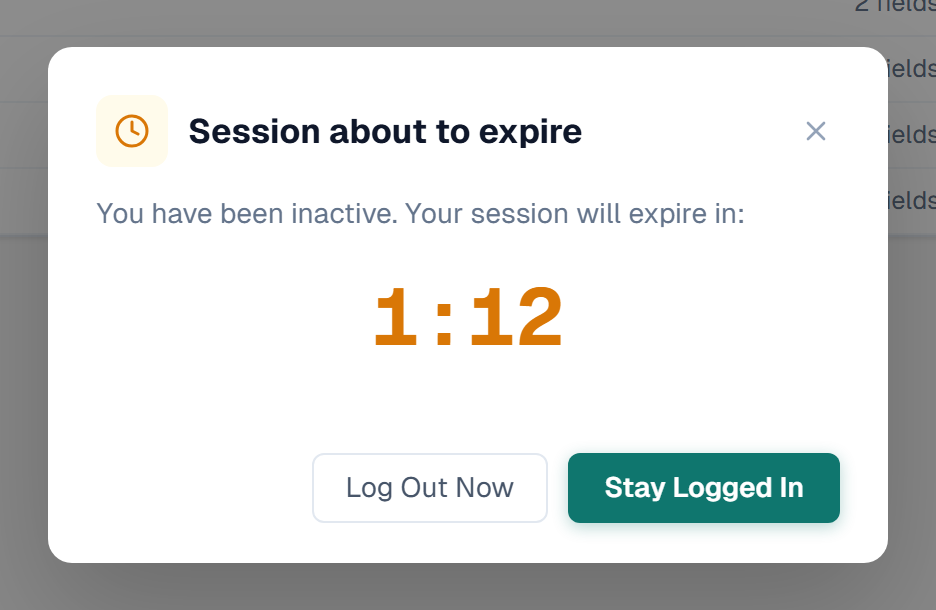
A modal appears before the session expires, headed Session about to expire, with a live countdown. The countdown turns red in the last minute.
It offers three choices:
- Stay Logged In — extends the session and clears the warning
- Log Out Now — signs out at once
- Close (×, or a click outside the card) — hides the modal but keeps the countdown running
The warning period is 5 minutes, or 60% of the session length when the session is shorter than about 8 minutes.
The banner
Closing the modal leaves a thin banner at the top of the screen: Session expires in m:ss, with its own Stay Logged In button. It turns red in the last minute.
Clicking the modal or the banner does not count as activity. If it did, answering the countdown would silently restart the timer instead of doing what you asked.
Change the timeout
- Go to Settings → General Settings.
- Find the Session Timeout card.
- Choose minutes or hours with the unit toggle.
- Click a preset, or type a value in the box.
- Click Save.
| Unit | Presets | Range |
|---|---|---|
| Minutes | 5, 15, 30, 45, 60, 90 | 5 to 10,080 |
| Hours | 1, 4, 8, 12, 24, 48 | 1 to 168 |
The card states how long before expiry the warning will appear for the value you picked.
Signing out other sessions
A user can be signed in from more than one browser at a time. Two events end the other sessions:
| Event | Effect |
|---|---|
| You change your own password | Every other session for your account is dropped. The tab you are working in stays signed in. |
| A password reset link is used | Every session for that account is dropped, including the one that requested the reset. |
Changing a password is the normal response to a suspected compromise, so a stolen token must not survive it.
Server restarts
Sessions are held in the API server's memory. Restarting the server ends every session and everyone signs in again. Restart after changing API routes or stored procedures, and expect that side effect.
Related
- Authentication — how a session starts
- Account Security — change your password
- General Settings — where the timeout lives
- Audit Log — sign-in and sign-out records