Number Formats
On this page
A number reaches Primentra in one of two ways. A person types or pastes it and sees the result before it is saved. Or a file, a staging table or the REST API sends it, and nobody looks. So the rule differs. When you type or paste, a comma works as the decimal point too. Everywhere else, write a plain dot and no thousands separator.
The rule per route
| Where the value comes from | Decimal separator | Why |
|---|---|---|
| Typing in a grid cell | . or , | You see the result before it is saved |
| Paste rows | . or , | The preview shows what was read, before anything is written |
| File upload | . only | Nobody is watching, and the file came out of another system |
| Staging tables | . only | Same |
| REST API | . only | Same |
No route accepts a thousands separator. Not 1.234,56, not 1,234.56, not 1 234,56. Write 1234.56.
That is what makes the comma safe where it is allowed. 1.234 is ambiguous: one thousand two hundred thirty-four in Amsterdam, one point two three four in London, and nothing in a file says which. With grouping refused everywhere, a lone comma can only be a decimal point.
Examples
Typing in a cell, or pasting rows. A person sees the result:
| You write | Primentra stores | |
|---|---|---|
1234.56 | 1234.56 | ✓ |
1234,56 | 1234.56 | ✓ a comma is read as the decimal point |
1,235 | 1.235 | ✓ |
1.234,56 | — | ✗ refused: two separators |
1,234.56 | — | ✗ refused: two separators |
1 234,56 | — | ✗ refused: a space is a separator too |
A file, a staging table or the REST API. Nobody is watching:
| The file says | Primentra stores | |
|---|---|---|
1234.56 | 1234.56 | ✓ |
1234,56 | — | ✗ refused, with the row number |
1.234 | — | ✗ refused in a whole-number column |
1.234 | 1.234 | ✓ in a decimal column: it is one and a bit |
1.0 | 1 | ✓ in a whole-number column: 1.0 is a whole number |
The same three characters can mean different things in different columns. 1.234 is one and a bit in a decimal column. In a whole-number column it is refused, because there it could only mean one thousand.
Whole numbers and decimals
| Data type | Typed or pasted | File, staging, REST API | Refused everywhere |
|---|---|---|---|
| Whole number | 42, -7 | Same, and 42.0 | 42.5, 1.234, 1,234, 42 000 |
| Decimal | 3.14 or 3,14 | 3.14 only | 1.234,56, 1,234.56, 3 000,50 |
A whole-number column takes 42.0 but not 42.5. The first is a whole number written with a decimal point, which some systems export. The second is not a whole number.
A clean file from a Dutch or German Excel
Before you export, set the column format to a plain number with no thousands separator. Or set the decimal separator of Excel to a dot under File › Options › Advanced, and save the sheet as CSV.
Why the rule is this strict
SQL Server keeps the same rule. CAST('1234.56' AS DECIMAL(22,10)) works, and CAST('1.234,56' AS DECIMAL(22,10)) and CAST('1,234.56' AS DECIMAL(22,10)) both fail. Primentra refuses what the database would refuse anyway, and tells you which row it was.
SAP MDG documents the rule in almost these words: a full stop for the decimal, no separator for grouping. Stibo STEP reads files this way unless you change a setting. Microsoft MDS never faced the question. Its staging tables were ordinary SQL Server columns, so whatever wrote to them did the parsing. CSV itself says nothing about number formats.
Number display
Everything above is about reading a number in. Number Display, in General Settings › Formats, changes only how a Whole number or Decimal column shows in the grid. Choose Plain (1234567.89), English (1,234,567.89), European (1.234.567,89) or Space (1 234 567,89). Plain is the default, so an installation looks the same after an upgrade until someone changes it.
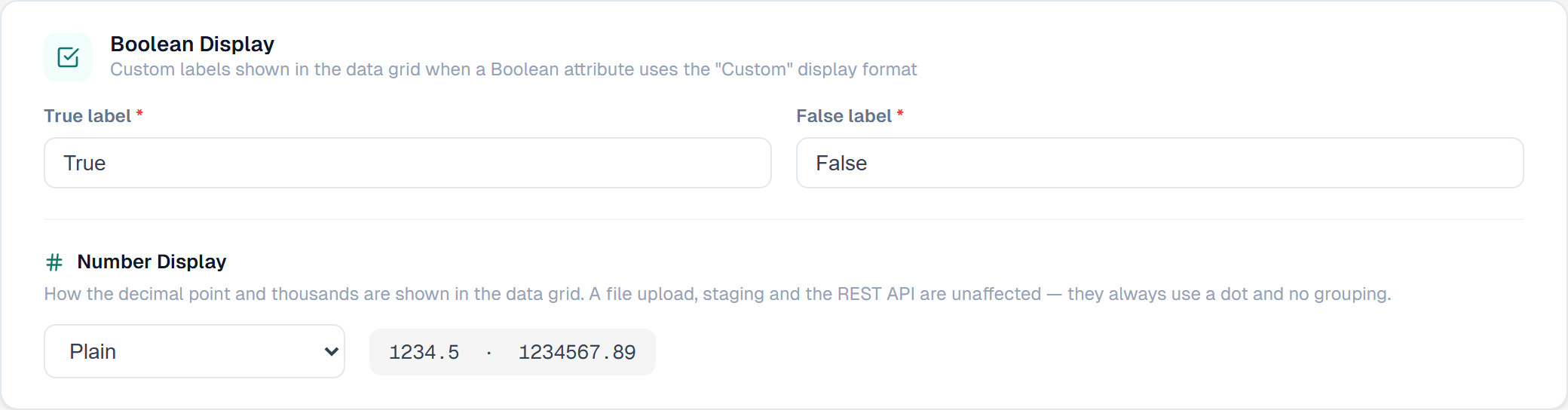
The setting changes the screen and nothing else. A file upload, staging and the REST API always read and write a plain dot with no grouping. A file you export under European display still holds 1234567.89, not 1.234.567,89.
A column filter matches what the screen shows. Type 1.234.567,89 into a filter under European display, and it finds the row that stores 1234567.89. Typing in a cell and pasting rows do not change with this setting: a dot or a plain comma is always the decimal point.
Related
- Import from Excel & CSV: what a file must hold for each data type
- Adding, Deleting & Pasting: typing and Paste rows
- General Settings: the Formats tab
Did not find what you need?
Try the troubleshooting pages, or ask us.