Advanced IF/THEN Builder
Every rule is built from the same two halves. The Custom rule template starts you with both of them empty, so you can express conditions no single template covers — for example, "if Discontinued is false and the supplier is ACME or NORDIC, then LaunchDate must have a value."
Open it: Settings → Manage Models → [Entity] → Business Rules → Gallery → Custom rule.
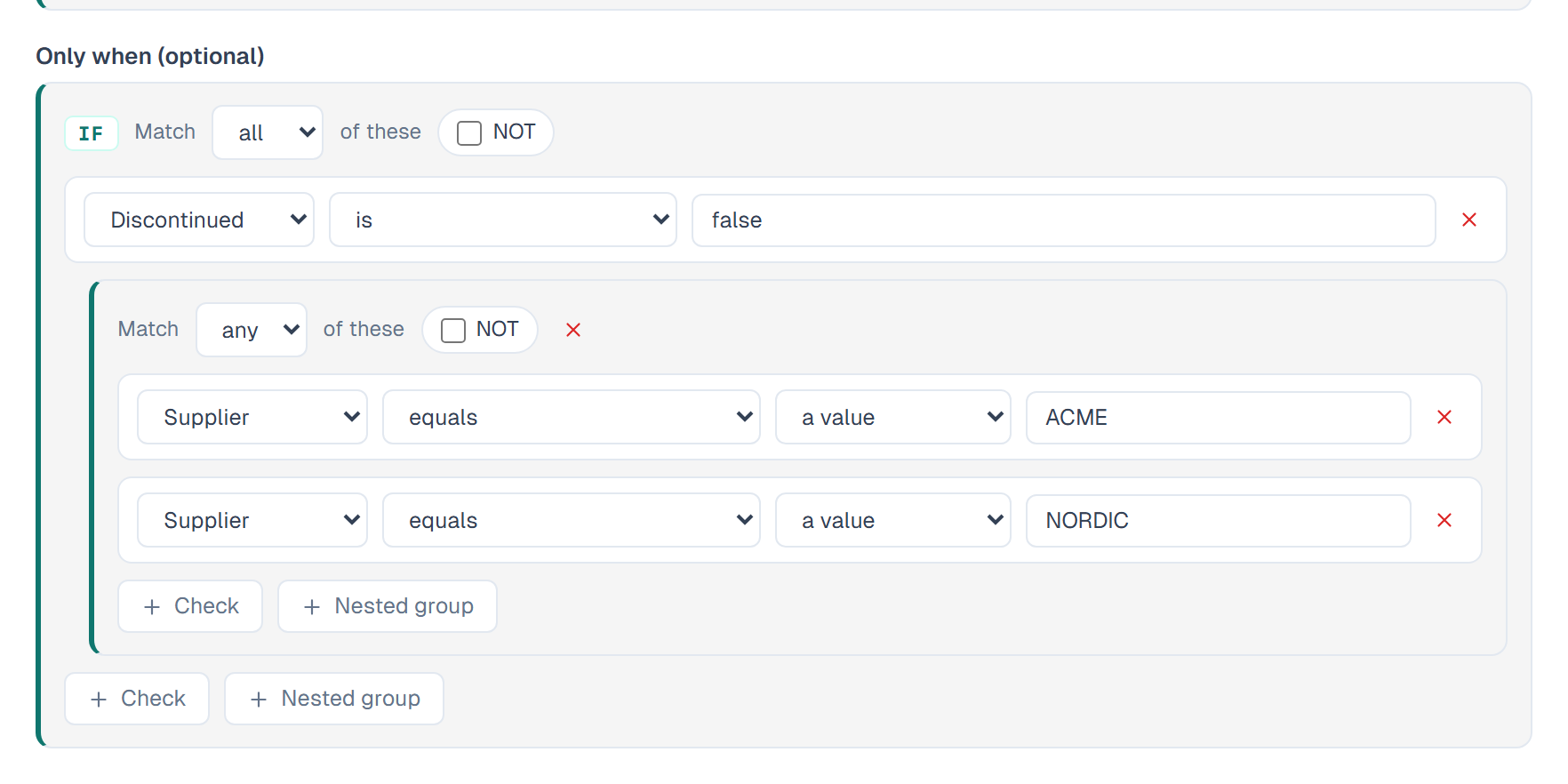
The two halves
| Half | Label in the form | What it holds |
|---|---|---|
| IF | Only when | Conditions that must be true for the rule to apply. Each check names its own column. |
| THEN | [Column] must satisfy | The assertion the row must pass. Every check tests the rule's own column. |
Leave the IF half empty and the assertion applies to every row. That is a valid rule, not a mistake.
Building a group
Each group has a header:
- Match all / any of these — joins the checks with AND or OR.
- NOT — inverts the whole group.
- Check — adds one check to the group.
- Nested group — adds a sub-group, which starts on the opposite combinator.
Nest groups to express *(A AND B) OR (C AND D)*. There is no depth limit.
Watch it done in 5:43 — a custom rule nests groups with all and any, and asserts a range on a column its condition never touches:
Comparing against something other than a value
Where a check takes one value, a second dropdown offers what to compare against:
- a value — you type it.
- another column — pick a column of the same data type in the same row.
- today — date checks only.
Watch it done in 5:43 — a rule measures one column against another in the same row, then the flagged rows are worked through:
Checks by data type
The data type of the column decides which checks are offered.
Number (Int, Decimal)
| Check | Notes |
|---|---|
| is between · is not between | Two values |
| is at least · is greater than · is at most · is less than | Value or another column |
| equals · does not equal | Value or another column |
| is a multiple of | |
| has at most … decimals | |
| has a value · is empty |
Watch it done in 5:30 — a Number limits rule sets a range, joins ranges with any, and switches from a warning to a refusal:
Text
| Check | Notes |
|---|---|
| matches the format | A mask: A letter, 9 digit, * either |
| is between … characters · is at least … · is at most … | Length |
| starts with · ends with · contains · does not contain | |
| is one of · is none of | Comma-separated list |
| equals · does not equal | Value or another column |
| is uppercase · has no special characters | |
| has a value · is empty |
Date
| Check | Notes |
|---|---|
| is after · is on or after · is before · is on or before | Value, another column, or today |
| is between | Two dates |
| is in the past · is in the future | |
| is within the last … · is within the next … · is at least … ago | Days |
| is a working day | |
| has a value · is empty |
Watch it done in 5:38 — a Date limits rule refuses an opening date in the future or before 2000, and leaves an empty date alone:
Boolean and Domain
| Check | Notes |
|---|---|
| is · is not | |
| is one of | Comma-separated list |
| has a value · is empty |
A rule that can never pass
Primentra intersects the numeric ranges in an AND group before you save. Where two checks leave no number that satisfies both, a red banner appears — *This rule can never pass* — and the Save rule and Test rule buttons are disabled until you fix it. A range with its bounds the wrong way round is caught the same way.
The message
Leave Message shown to the user empty and Primentra uses the sentence shown under This rule reads. Fill it in to say something specific to your process. Only the message of the first failing error rule appears when a save is refused.
Related
- Creating a Rule from Templates — the nine starting points
- Test Before Saving — count the rows that would fail before you save
- Validating Entities — how a failure appears in the grid
- Attributes & Data Types — data types and what they store