
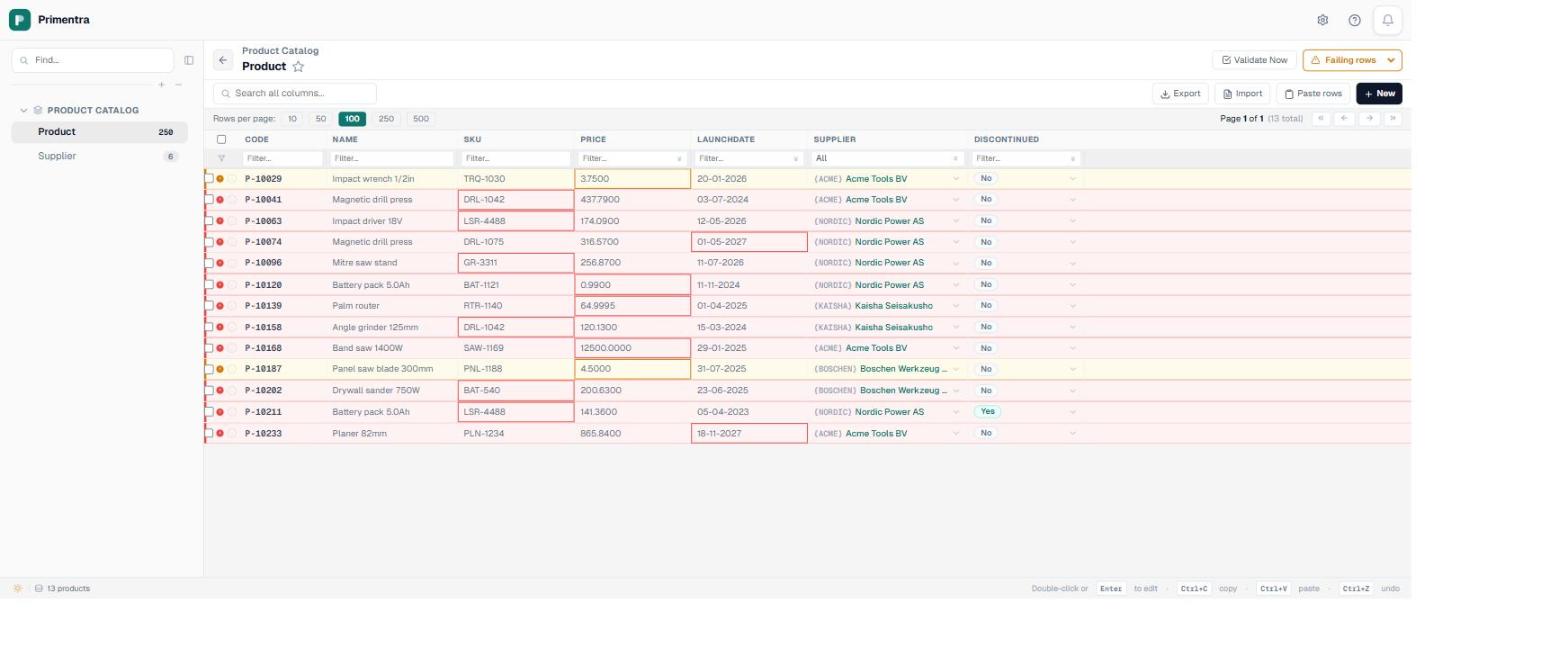
In the catalogue I use for these posts there are two products with a launch date of 2027, and both are on sale today. Nothing about them is invalid. 01-05-2027 is a perfectly good date, the column accepted it without a murmur, and it will sit there until somebody notices the product has been shipping for a year before it launched.
That is the shape of nearly every date problem in master data. Not a malformed value — the data type already stopped those — but a valid date in the wrong place. A contract ending before it starts. A certificate that expired in March. An employee hired the day after they left.
The thirteen operators
The three that MDS never had
withinLast, withinNext and atLeastAgo take a number of days rather than a date. That sounds like a small convenience and is the difference between a rule you write once and a rule somebody has to maintain.
Consider “every supplier record must have been reviewed in the last year”. Written against a fixed date it is reviewed after 1 January 2026, which is correct in January, wrong by June, and quietly meaningless by the following spring. Written as within the last 365 days it is evaluated against the current date every time the rule runs and never needs touching. The same applies to expires within the next 90 days, which is the rule that actually surfaces a certificate before it lapses rather than after.
In MDS this class of rule was not really expressible. You could compare an attribute with a fixed value or with another attribute, and anything relative to “now” meant a stored procedure, a scheduled job, or a report somebody remembered to run. Teams built all three. Most of what a rules inventory contains, by the time you come to migrate it, is scaffolding around that gap.
One date against another
The comparison operators take three kinds of right-hand side: a fixed date, today, or another column in the same row. The third is the one that matters most and is the easiest to forget exists.
ClosesOn is on or after OpenedOn. EndDate is after StartDate. DeliveredOn is on or after OrderedOn. Each is one leaf with the source switched from a value to a column, and each catches a class of error that no per-column constraint can see, because the mistake is only visible when you look at two cells at once. The Compare two columns template exists purely to set this up without hunting for the switch.
Watch the blanks here. A rule is asserted only against rows that hold a value in the column it targets, and a comparison against an empty partner column has nothing to compare with. A row with an end date and no start date will not be caught by this rule; catching that one is a presence rule, and usually a conditional one.
The launch date rule, in full
Back to the two products launching in 2027. The naive rule is “LaunchDate is not in the future”, and it is wrong, because a catalogue is supposed to contain products that have not launched yet. That is the entire point of a launch date.
The rule that is actually true is narrower: a product that is on sale must not have a launch date in the future. So the IF side says Discontinued is false, and the THEN side says the launch date is not in the future. Two leaves, one negation, and it fires on exactly the rows where the combination is contradictory rather than on every forthcoming product.
That is the general lesson about date rules and it is worth stating on its own. The date is rarely wrong by itself. It is wrong given something else about the row, and the moment you notice that, you are writing a conditional rule rather than a date rule.
Working days, and what the operator does not know
weekday asserts that a date falls Monday to Friday. It is genuinely useful on effective dates, delivery dates and anything that is supposed to line up with a business calendar, and it catches the classic import artefact where a whole batch lands on a Sunday because somebody added seven days to the wrong column.
It does not know about public holidays, and it should not. Holidays vary by country, by region and by year, and the moment an operator claims to know them it is wrong for somebody. If you need them excluded, hold them in an entity like any other reference data and compare against it. That keeps the calendar something your business owns and can edit, rather than something baked into a validation engine that ships twice a year.
There is one date fault no operator on this list will catch, and it is worth knowing about separately: a column whose hour has been flattened to 00:00 by a bad load. Every value is still a valid date, still on a weekday, still in range. Where a time column loses its time has the SQL that finds it.
Start with warnings
Date rules find more history than any other kind, because dates accumulate. A review-date rule pointed at a supplier table that has never had one will light up almost every row, and setting that to error means nobody can save anything until the whole backlog is cleared.
Run Test rule first to see the number, then decide. Warning severity marks the rows and blocks nothing, which turns a rule into a worklist. When the worklist is empty, promote it to error. The guide to the engine covers how severity behaves on each write path, which matters here because a date rule is usually the one an overnight feed trips first.
Common questions
Which date operators are there?
Thirteen: after, on or after, before, on or before, between, in the past, in the future, within the last N days, within the next N days, at least N days ago, is a working day, has a value, is empty. The comparisons can point at a fixed date, at today, or at another column.
How do I keep a rule correct next year?
Use a relative operator instead of a fixed date. Within the last N days, within the next N days and at least N days ago are evaluated against the current date every time the rule runs, so nobody has to edit them in January.
Can I compare two date columns?
Yes. Any comparison operator can take another column as its right-hand side instead of a value, which is how an end date is held on or after a start date, per row.
Does the working day check know about holidays?
No. It checks Monday to Friday. Public holidays are data rather than logic — hold them in an entity and compare against it.
Ask your data one date question
Pick the column everyone assumes is maintained, write “within the last 365 days”, and press Test rule. The number that comes back is usually the interesting part. Primentra runs on your own SQL Server, deploys in a day, and costs €7,500 per year flat, with a 60-day trial.