
The rule takes three clicks and nobody disputes it: every supplier needs a VAT number in the right format. You save it. Eleven years of accumulated master data turns red. Twelve thousand rows, most of them suppliers nobody has touched since 2019. Somebody asks whether the rule can come off again until the data is cleaned up.
It usually does come off. That is why so many teams own a validation engine they have never used in anger: the rule was right, the data was old, and nobody had a plan for the gap between them. We built the rule editor around that gap, because every customer we watched hit it hit it in the first week.
Clean it first is a project with no end
The tempting order is: clean the twelve thousand rows, then turn the rule on. It sounds disciplined. In practice the cleanup competes with everything else on the team's plate, runs for two quarters, and meanwhile nothing stops a thirteenth thousand from arriving, because the rule that would have caught it is sitting in a draft.
This is the same trap as trying to cleanse a legacy extract before an initial data load, and it has the same answer. Get the rule enforcing on new work immediately. Treat the old rows as a backlog with a number attached, not as a precondition.
Which means the question is not whether to turn the rule on. It is what the rule should do on the day you turn it on.
Find out the number before you commit
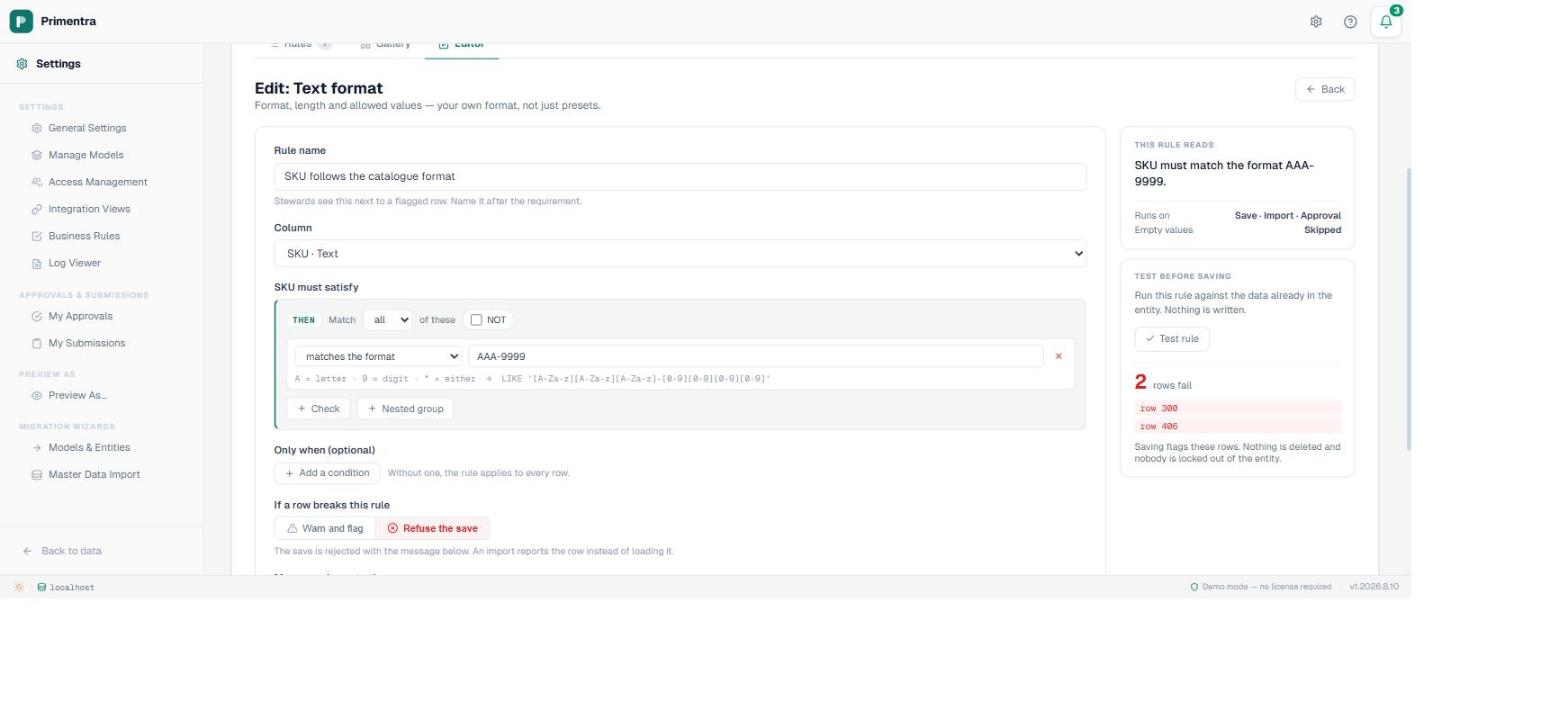
The rule editor has a Test rule button. It runs whatever definition is on screen, saved or not, against the data already in the entity, and tells you how many rows fail and which ones. Nothing is written. No failure records are kept.
Two numbers come out of that, and they lead to different decisions. Two failing rows means a data-entry slip you can fix this afternoon. Twelve thousand means the rule describes a convention the business never actually followed, which is a more interesting finding than a typo and a much longer conversation.
A third outcome is worth watching for: zero failures on a rule you expected to bite. Usually that means the column is emptier than you think, for reasons covered further down.
Land it as a warning
Under If a row breaks this rule there are two choices: Warn and flag or Refuse the save. New rules default to warn, and on an entity with history that default is the whole strategy rather than a timid setting.
A warning marks every offending row and refuses nothing. Stewards keep working. The twelve thousand rows become a counted, assignable list on the day the rule goes live, which is the outcome the cleanup project was supposed to deliver in two quarters.
Refuse the save on day one does something harsher than most people picture. It does not block the twelve thousand bad rows from existing — they already exist. It blocks the next person who opens one of them to change a phone number, and hands them a VAT number problem they did not create and may not be allowed to fix. You have converted a data quality issue into a workflow issue, and the workflow issue is louder.
What refuse actually refuses
Before you promote a rule, know what the strict setting does on each way into the entity, because they are not the same:
The mechanics behind each of those, including why a staged row has to be written before it can be judged, are in what a business rule does on import, staging and approval. A warning behaves identically everywhere: the write succeeds and the row is marked.
The backlog is a work queue, not an error log
Validate Now runs every active rule across every row in the entity and records what it finds. On a large entity it works through the rows in slices and picks up where it left off, so it does not hold a table for the length of the pass. The entity keeps the timestamp of the last run, which matters more than it sounds: a failure count without a date is a number nobody trusts.
What comes out is not a report you export and mail around. The grid gets a Failing rows filter, the failing cells are outlined, and each row carries the rule's own message. A steward filters to the failures, sorts by supplier, and fixes forty of them in an afternoon in the same grid they use for everything else.
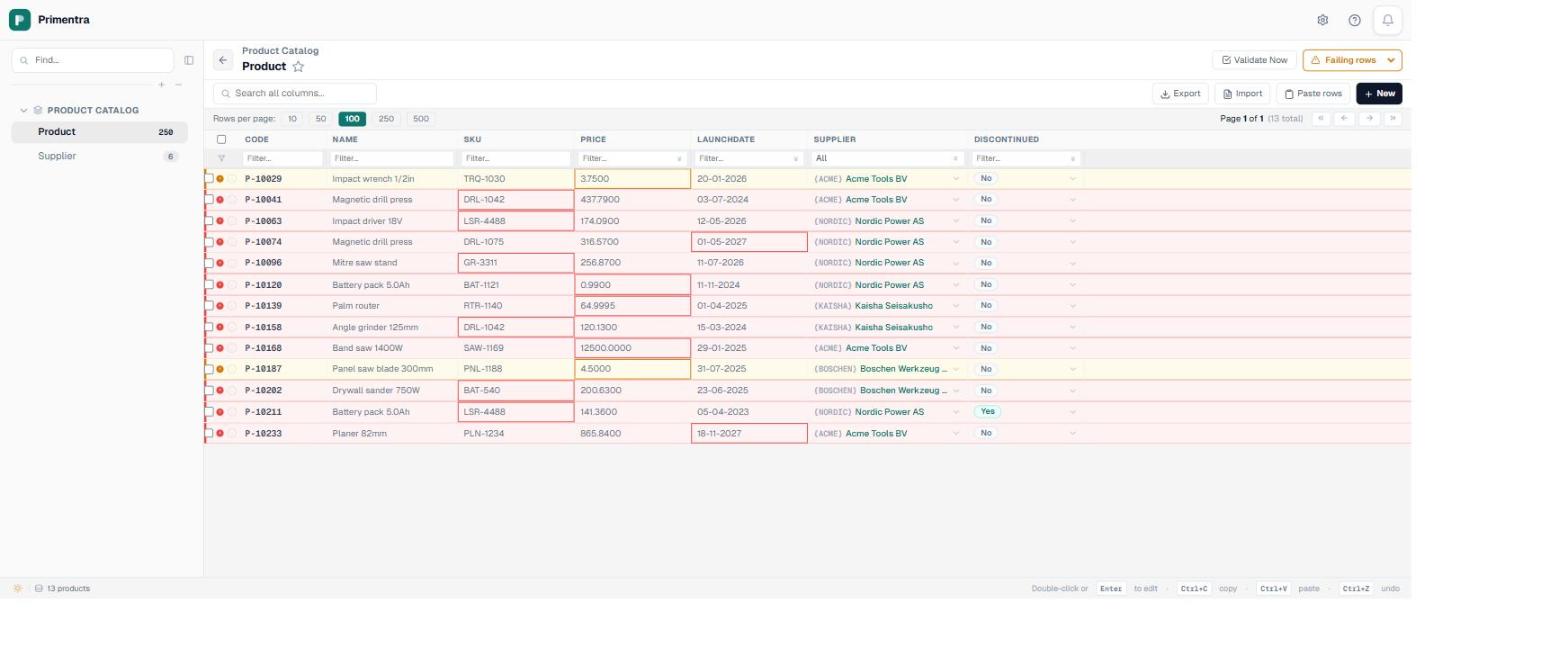
Track the count weekly and it behaves like any other queue. Twelve thousand falling to nine thousand to four is a project with a visible end. Twelve thousand holding flat for a month means either the rule is wrong or nobody was given the work. Both are worth learning in week two rather than in an audit.
The blank rows are not passing
One behaviour catches everybody, and it is the reason a rule sometimes reports a suspiciously low number. A rule is asserted only against rows where the target column actually holds a value. Empty values are skipped.
So a VAT format rule ignores every supplier with no VAT number at all. A uniqueness rule never reports two blanks as duplicates. That is correct behaviour, because two unknowns are not the same thing, but it means the four hundred suppliers missing a VAT number entirely sail straight through a rule written to police VAT numbers.
Requiring the value is a separate rule, and on most columns it is the one you actually want first. Format without presence polices the people who filled the field in and lets the empty rows past, which is close to the opposite of the intent.
When to promote it
Switch a rule from warn to refuse when the count reaches zero, or close enough that the remainder is a known list somebody owns. At that point strictness costs nothing, because there is no longer a population of innocent rows for it to ambush.
Some rules never get promoted, and that is a legitimate resting place rather than a failure. A rule encoding a preference, such as a description being longer than ten characters, is useful as a permanent warning and obnoxious as a refusal. Reserve refusal for the values that cause damage downstream: an invoice nobody can match, a payment to the wrong bank account.
The sequence that works:
- Write the rule and test it before saving, so you know the number you are taking on.
- Save it as a warning and run a full validation pass the same day.
- Add the presence rule if the column is one that must be filled in, or the blanks stay invisible.
- Give the backlog to somebody with the count and the date, and check it weekly.
- Promote to refuse when the queue empties, or leave it as a warning on purpose and say so.
None of this is exotic, and it decides whether you end up with a validation engine that runs or one that got switched off in week one. The engine is rarely the deciding factor. Planning for the data that was already there is. The guide to the engine covers what a rule can express; preventing bad data at entry covers which rules earn their keep.
Common questions
What happens to existing records when I add a rule?
Nothing is changed, deleted or locked. Saving a rule flags the rows that break it, and a validation pass you run yourself produces the list. A warning rule leaves every one of those rows editable.
Can I test a rule before saving it?
Yes. Test rule runs the unsaved definition against real data and tells you how many rows fail. Nothing is written, and no failure records are kept.
Warning or error for a new rule?
Warning. It makes the backlog visible without refusing anybody’s work. Promote it to refuse the save when the backlog is clear.
Do blank values fail a rule?
No. A rule is only asserted where the column holds a value, so two blanks never collide on a uniqueness rule. Requiring a value is a separate presence rule.
Point one rule at your worst entity
Load a real extract, write the rule you have wanted for years, and press Test rule. The number that comes back is the most honest data quality measurement you will get this quarter, and it costs an afternoon. Primentra runs on your own SQL Server, deploys in a day, and costs €7,500 per year flat, with a 60-day trial.