
Make a field required and you get one of two outcomes. Either it genuinely applies to every row, in which case the required toggle on the attribute was always the right answer, or it does not, and within a month the column is full of dashes, dots, single spaces and the word N/A. The dashes are not a discipline problem. They are what happens when you ask people a question that does not apply to them and refuse to let them past until they answer.
The shape of a conditional rule
Every rule in Primentra has an IF side and a THEN side. Most rules leave the IF empty, which means they apply to every row. Fill it in and the rule becomes conditional: rows that do not match the condition are not evaluated at all, so they cannot fail it.
That is the whole idea, and it is worth dwelling on the “not evaluated at all” part. A conditional rule does not pass rows that fail the condition; it ignores them. The distinction matters when you are reading a count of failures and wondering whether the number is small because the data is clean or because the condition never matched anything.
AND, OR, NOT, and brackets
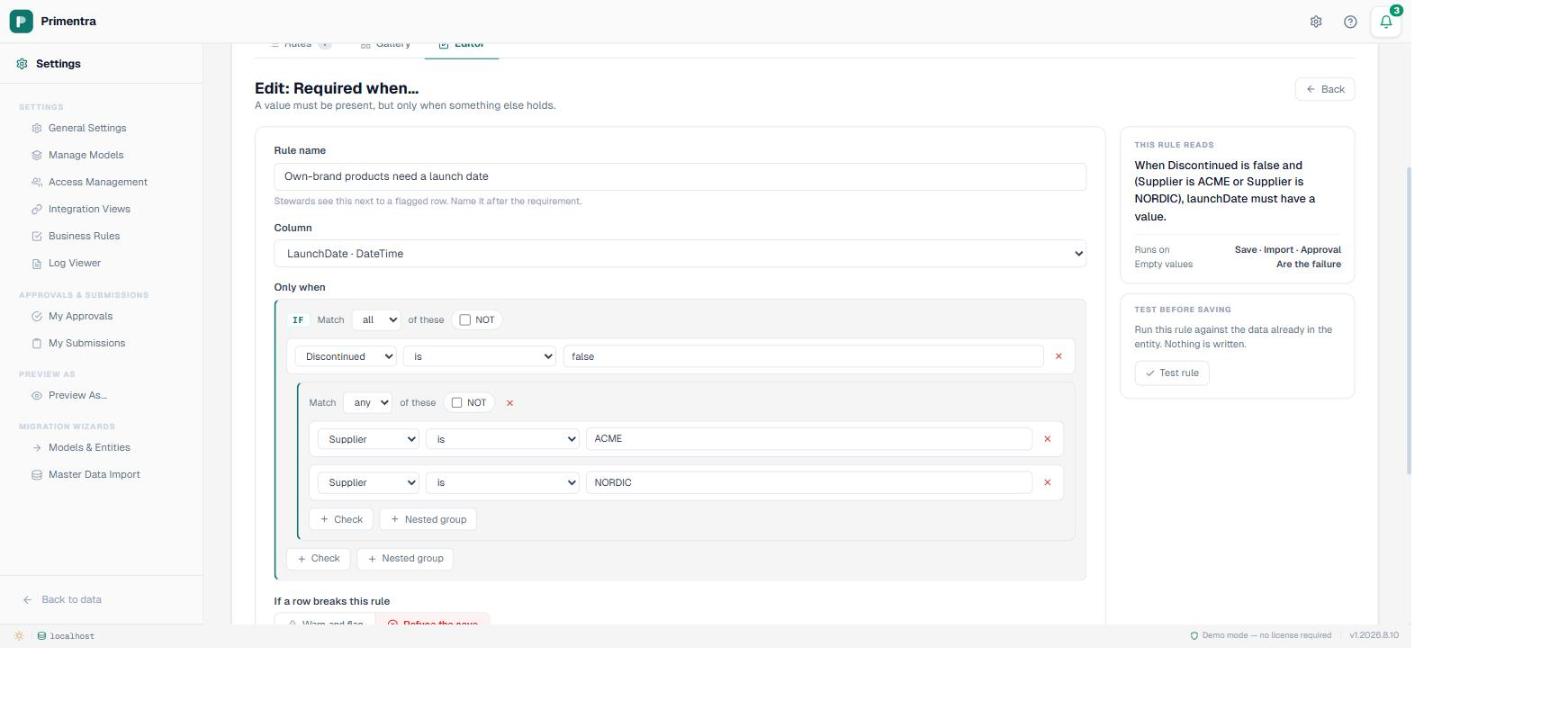
Both sides of a rule are the same structure, which is the thing that makes the builder small enough to learn in one sitting. A group has a combinator — match all of these, or match any of these — a checkbox for NOT, and a list of children. A child is either one comparison or another group.
So AND and OR are the combinator. Brackets are a nested group. NOT inverts whatever the group came to. There is no expression language to learn and no precedence to remember, because the nesting is the precedence — what you see indented is what binds tighter.
NOT is the one worth being careful with. “Not in the future” is a group containing is in the future with NOT ticked, and that reads fine. But NOT over a group set to match any means “none of these”, which is not what most people expect the first time. This is exactly where the panel that reads the rule back as a sentence earns its place: a rule that is subtly inverted looks correct as a row of dropdowns and reads obviously wrong in English.
A real one, taken apart
The catalogue rule I keep coming back to is this: IF Discontinued is false THEN LaunchDate must not be in the future.
Unconditionally, that rule is wrong. A product catalogue is supposed to contain things that have not launched yet; that is what a launch date is for. Applied to every row it would flag every forthcoming product and the stewards would switch it off within a day, which is the fate of most badly scoped rules.
With the condition it says something narrower and actually true: a product still selling cannot also be launching next year. In a catalogue of 250 it catches two rows, and both are genuine contradictions rather than noise. That ratio is the test of a conditional rule. If it fires on ten per cent of the table, the condition is too broad or the assertion is too strict, and either way somebody will turn it off.
Coming off MDS with a rule inventory
MDS gave you a point-and-click builder with IF conditions, THEN actions and a priority order, and the reason people remember it as heavy is that the actions could write data as well as check it.
This section used to say Primentra's rules only check, and that setting a value was a deliberate line we would not cross. That was true when this shipped. It stopped being true in August, and I would rather show you what moved than quietly rewrite the paragraph. What changed is narrower than MDS's version, and the narrowness is the point.
A rule can now fill a column — IF Concern is Open Universiteit, THEN Level becomes 3 — but only where that column was left empty. It never overwrites a value somebody entered, and a zero or a false counts as entered. That single restriction is what makes it possible to reason about the engine again: a checking rule can still be read on its own, because the only rows a filling rule touched were rows with nothing in that column. Filling runs before checking, in an order you set, and every fill is written to the audit log naming the rule. MDS's value changes bypassed its transaction log entirely, which is the specific failure this design is built around.
Computed values — Code = concat(A, B), arithmetic across columns — are still out. Same machinery, harder problem, and it needs an answer for evaluation order between computed columns before it is worth having.
So when you sort an inventory of MDS rules, three piles come out. The largest is rules that were only ever attribute properties — required, data type, a value from a list — and those do not need rebuilding as rules at all. The second is genuine conditionals, and this is where they land. The third used to be the awkward pile: rules that set values. Most of those now rebuild directly as filling rules. What is left in that pile is the computed ones, and those still need a different answer — sometimes an integration, occasionally the honest realisation that a human was making that decision and the rule was hiding it.
When it is not a rule at all
“A new supplier cannot go live until someone has checked the bank details” looks like a conditional rule and is not one. There is no expression over the row that evaluates to whether the bank details are real. What you actually want is a person, which is an approval workflow: the change is held, a reviewer who is not the author sees the diff, and nothing reaches live data until they approve it.
The two mechanisms compose, and the combination is the useful part. Rules stop the objectively wrong rows at the door so the approver is not wading through typos, and the approver spends their attention on the judgment calls that no expression could have made. Getting that split right does more for a data quality programme than any individual rule does.
Practical notes
- Blank is not false. A condition on a column with no value does not match, so rows where the deciding column is empty fall out of the rule entirely. If those rows are the ones you are worried about, you need a second rule requiring the deciding column itself.
- Test before you turn it on. The editor runs the rule you are editing against the whole entity without writing anything, which is the only reliable way to find out whether your condition matches three rows or thirty thousand.
- Name it after the requirement. The rule name is what a steward sees next to a flagged row. “A live product cannot launch in the future” explains itself; “Rule 7” sends them to find you.
- Two clear rules beat one clever one. Deep nesting is possible and rarely wise. Rules are individually named and individually reported, so splitting them makes the grid more legible, not less.
For the rest of the vocabulary — the operators, the severities, and which write path enforces what — the guide to the engine covers the ground this post assumes.
Common questions
How do I make a field required only sometimes?
A rule with an IF side and a presence assertion on the THEN side — the Required when template. Rows that do not match the condition are not evaluated at all, so nobody sees a field that does not apply to them.
Can a condition use several columns?
Yes. The IF side is a boolean tree with a combinator of all or any, an optional NOT, and any number of leaves or nested groups. Brackets are just a group inside a group.
Rule or approval workflow?
A rule evaluates an expression, so it fits anything objectively true or false. An approval puts a person in the path, so it fits anything needing judgment. Rules cannot judge; approvals cannot scan half a million rows.
How deep can nesting go?
The evaluator flattens eight levels and the builder does not yet stop you going further, so keep generated rules under that. Two levels covers almost everything in practice.
Take the worst required field you have and narrow it
Find the column full of dashes, work out the condition under which it genuinely applies, and write that as one rule. Primentra runs on your own SQL Server, deploys in a day, and costs €7,500 per year flat. The 60-day trial is long enough to migrate one real entity and sort its rule pile properly.