
“Rules are enforced on every write path” is the sentence every product page reaches for, including ours. It is true. It is also not enough to plan an integration with, because the four paths do something different with a broken row, and if you assume they all refuse it you will build a feed that silently does the opposite of what you expected.
One evaluator, four callers
The rules themselves live in one stored procedure. That is the part that must not be duplicated, because two implementations of the same rule drift apart and the drift is invisible until an audit. What differs is not the verdict but what each caller does with it, and each difference exists for a reason that shows up in operations rather than in a feature list.
The grid, and the API behind it
A steward edits a cell and presses enter. The save procedure writes the row, validates it, and if any failure is error severity it throws, which rolls the whole transaction back. The row keeps its old value and the message on screen is the rule's own, not a constraint violation.
Because the validation and the write share a transaction, the rollback removes the failure record too. Nothing survives a refused save, which is what you want — a rejected edit should leave no trace in the data or in the failure table.
The REST API writes through the same procedure. This is worth stating explicitly because it is the question every integration architect asks and most vendors answer vaguely: there is no second code path, so an API client cannot write a row a steward could not. A warning behaves the same way on both — the write succeeds and the row is marked.
Staging: written first, then put back
This is the one with the interesting mechanics, and the one that changed most recently.
The obvious design is to validate staged rows before writing them. It does not work, for two reasons that only become clear once you try it. An inserted row does not exist yet, so there is nothing to validate — and insert is the normal case for an ETL feed. An updated row still holds its old values, so validating early checks the data you are about to replace rather than the data arriving. Between them those two cover every row in a batch, which is a long way of saying that validating early enforces nothing at all.
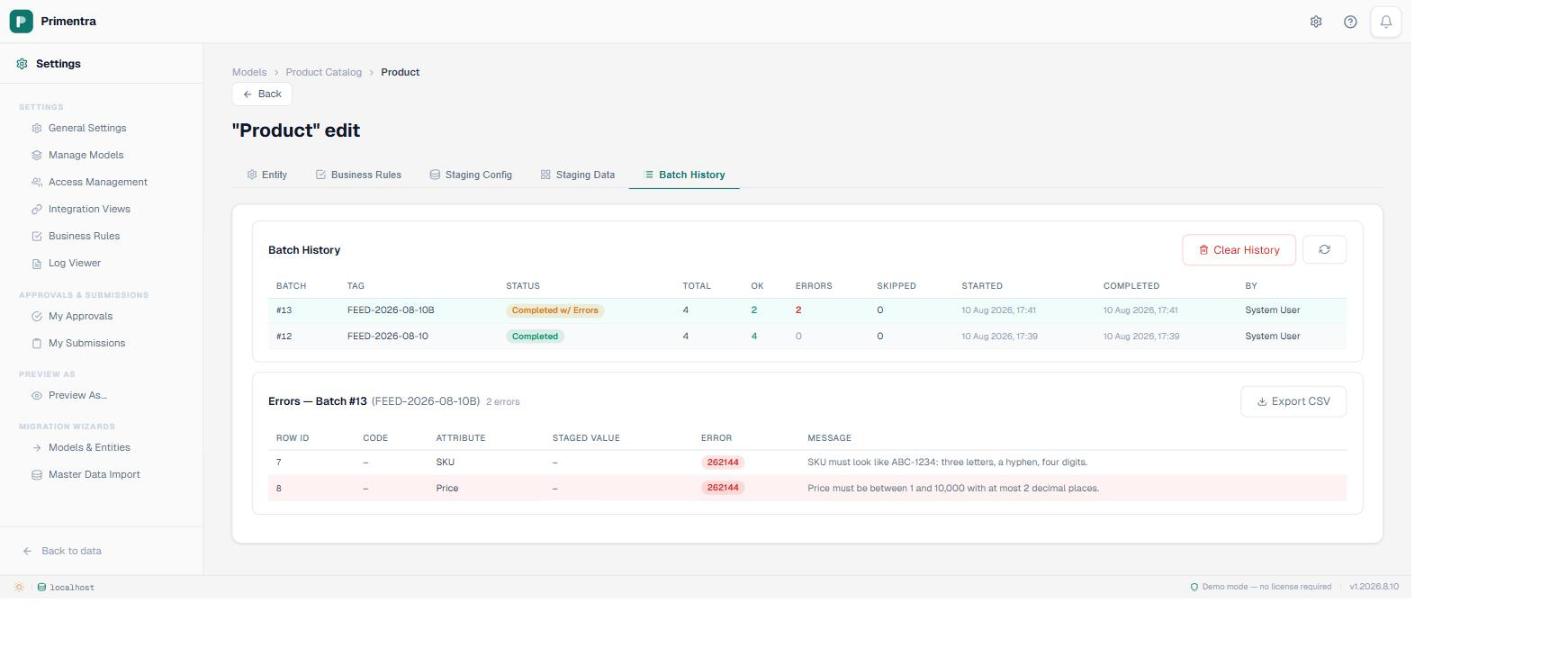
So the batch does it the other way round. It captures a pre-image of every row it is about to update, writes the whole batch, and then evaluates the rules over everything it touched. Rows that break an error rule are reversed individually: an inserted row is deleted, an updated row is restored wholesale from its pre-image. The staging row is flagged with error code 262144 and gets a StagingErrorDetails entry carrying the rule's own message, so the drill-down tells the operator which rule refused the row rather than that something went wrong.
Evaluating the whole batch in one pass is also what makes uniqueness work here. Two staged rows carrying the same key can only be seen to collide once both have been written; check them one at a time before the write and neither has a partner to collide with.
The rest of the batch still loads. A feed of ten thousand rows with four bad ones lands 9,996 rows and finishes as Completed with errors, which is almost always what an overnight job should do. Rows that only raised a warning are written and marked, exactly as a warning from a grid save would be, so a warning arriving through a feed is visible in the same filter as one raised by a person.
File import: everything lands, then it is counted
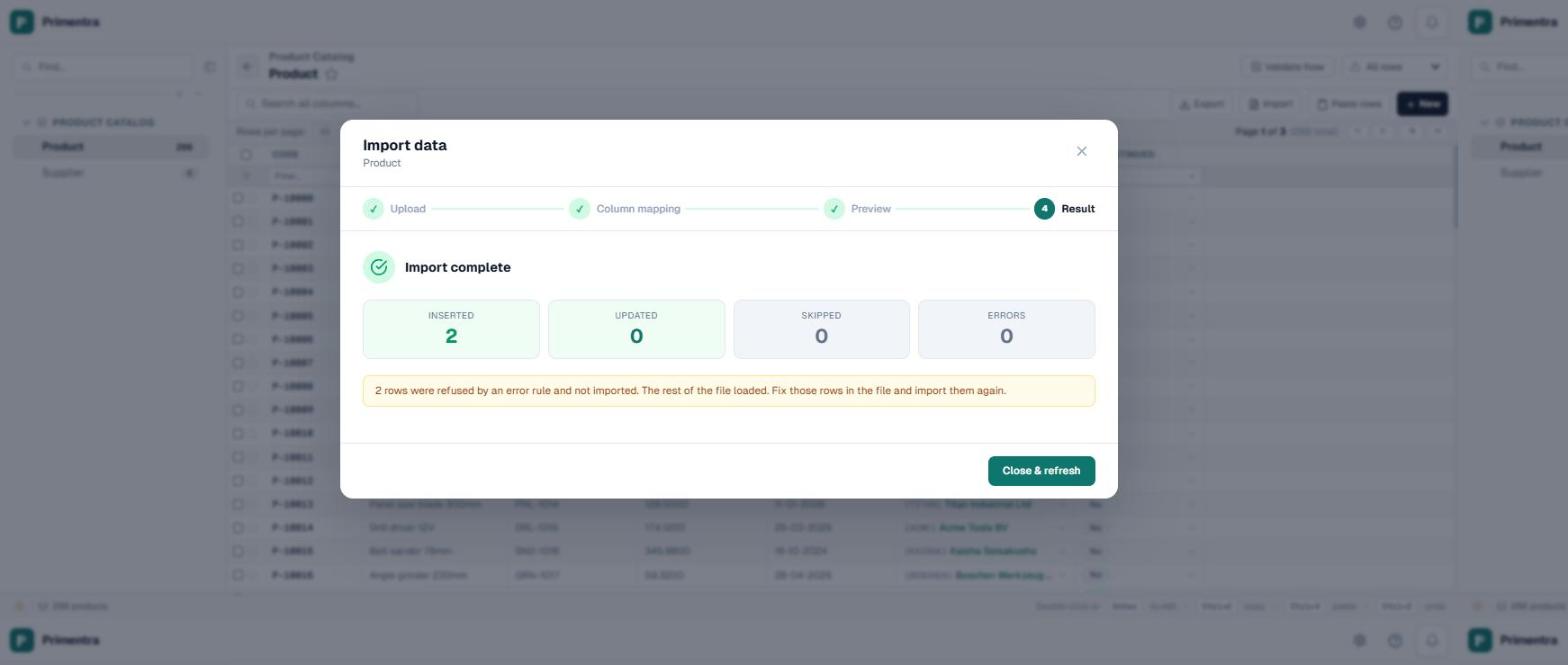
This is the one path where you get to choose, and the choice matters more than it looks. The import wizard has a Refuse rows that break an error rule option, on by default. Leave it on and a bad row is written, found by the post-import pass, and put back, while the rest of the file loads. Switch it off and every row lands and the breakages are counted instead.
Which default is right depends on what the file is. A supplier feed dropping into an entity you already govern should refuse the bad rows: you want the three broken ones back in somebody's inbox, not in the master data. A migration is the opposite. You are moving twenty years of data out of a system that did not have these rules, it is going to violate them — that is why you are moving — and an import that refused every non-compliant row would refuse most of the file and leave you with a partial data set and no way to see the whole picture. So the MDS migration import never blocks, whatever the grid's import is set to.
In practice that makes the first validation run after a migration the most useful report in the project. Load the entity, let the rules run, then filter the grid to failing rows and you have a worklist ordered by the thing that is actually wrong. It is a much better starting point than a spreadsheet of assumptions about data quality, and it is why reconciling a migration and validating one are two separate jobs.
Approval: checked when it lands, not when it was proposed
A changeset can sit for days. The rules that applied when it was submitted are not necessarily the rules that apply when somebody approves it, and the rest of the data has moved on in the meantime — a SKU that was unique on Tuesday may not be by Friday.
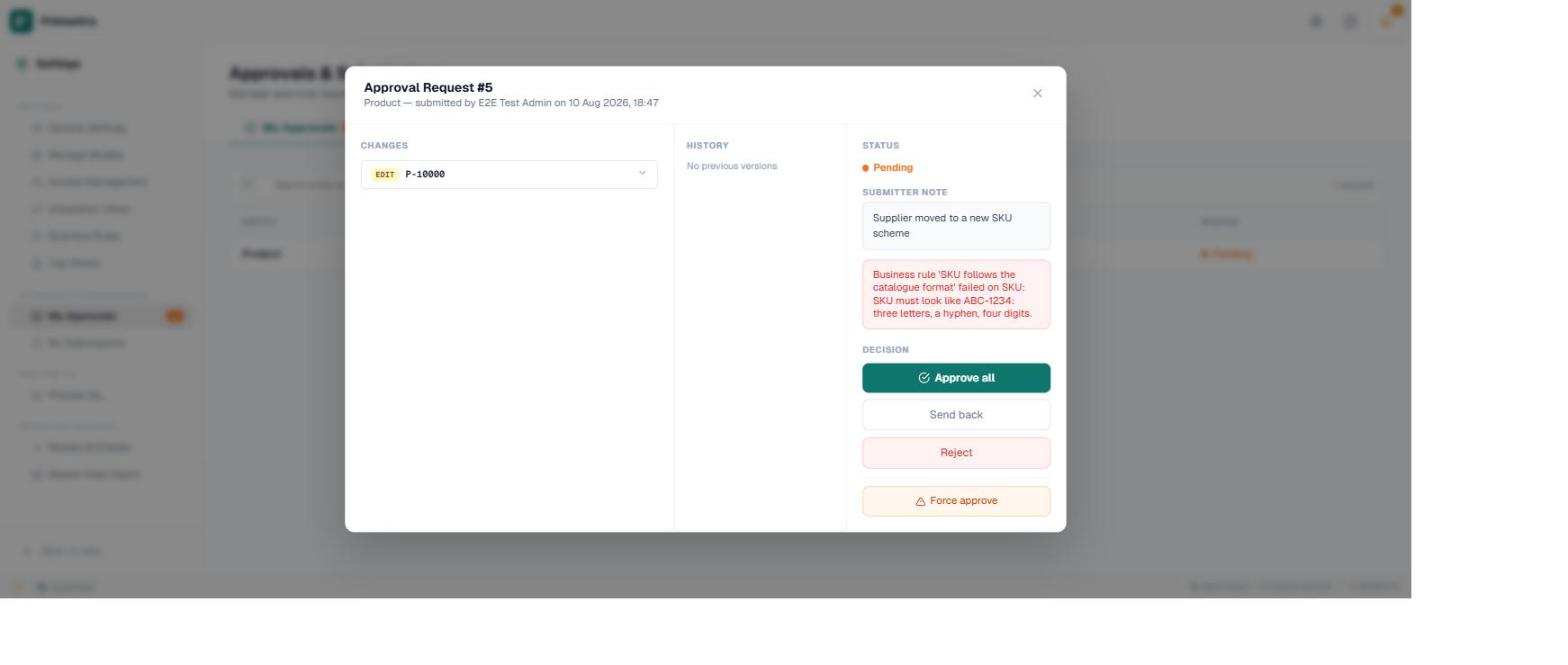
So validation happens at apply time. The approval writes the change, validates the row, and refuses it on an error. That holds on all three routes: approve, approve all, and force approve.
Force approve deserves its own sentence, because the name invites the wrong assumption. It overrides who is allowed to sign off — the approver requirement, the not-your-own-changes rule — and not whether the data is valid. There is no route through the approval system that writes a row an error rule would refuse.
What this means when you design a feed
- Use staging for recurring loads. It is the only path that both enforces rules and survives bad rows, which is exactly the combination an overnight job needs. Check the batch result rather than assuming success.
- Use file import for migration, once, with the refuse option off. It is built for dirty legacy data and will not stop you. Validate afterwards and work the list.
- Watch the severity split. An error rule on a feed means rows get put back and somebody has to notice. A warning rule means everything lands and the problems are visible in the grid. For a first load of an unfamiliar source, warnings tell you more.
- Every check runs in the database. That is deliberate, and it is why there is no regex operator: SQL Server cannot evaluate one, so a rule written that way would be carried straight past by any feed. Use a format mask for anything that has to hold on a load.
The rest of the vocabulary — what a rule is made of, the operators, and how severity works — is in the guide to the engine. If you are building the staging side, how the staging scheduler works covers the machinery this post sits on top of. And before you set anything to refuse the save on an entity with history, turning a rule on against data you already have covers the backlog that appears the moment you do.
Common questions
Are rules enforced on a bulk import?
Your choice, per import. The wizard refuses rows that break an error rule by default and loads the rest; switch it off and everything lands and is counted afterwards. The MDS migration import never blocks, because legacy data is expected to be dirty.
What happens to a staged row that breaks a rule?
It is written, found, and put back — an insert deleted, an update restored from a pre-image. The staging row is flagged 262144 with the rule’s own message, and the rest of the batch still loads.
Does force approve skip the rules?
No. It overrides who may sign off, not whether the data is valid. All three approval routes validate at apply time.
Can the REST API bypass a rule?
No. It writes through the same stored procedure as the grid, so it inherits the same behaviour. There is no second validation path to drift out of step.
Run one real feed against one real rule
Load a batch through staging with a rule deliberately broken on a couple of rows, and watch what comes back. It is the fastest way to understand the behaviour you are going to depend on. Primentra runs on your own SQL Server, deploys in a day, and costs €7,500 per year flat, with a 60-day trial.