
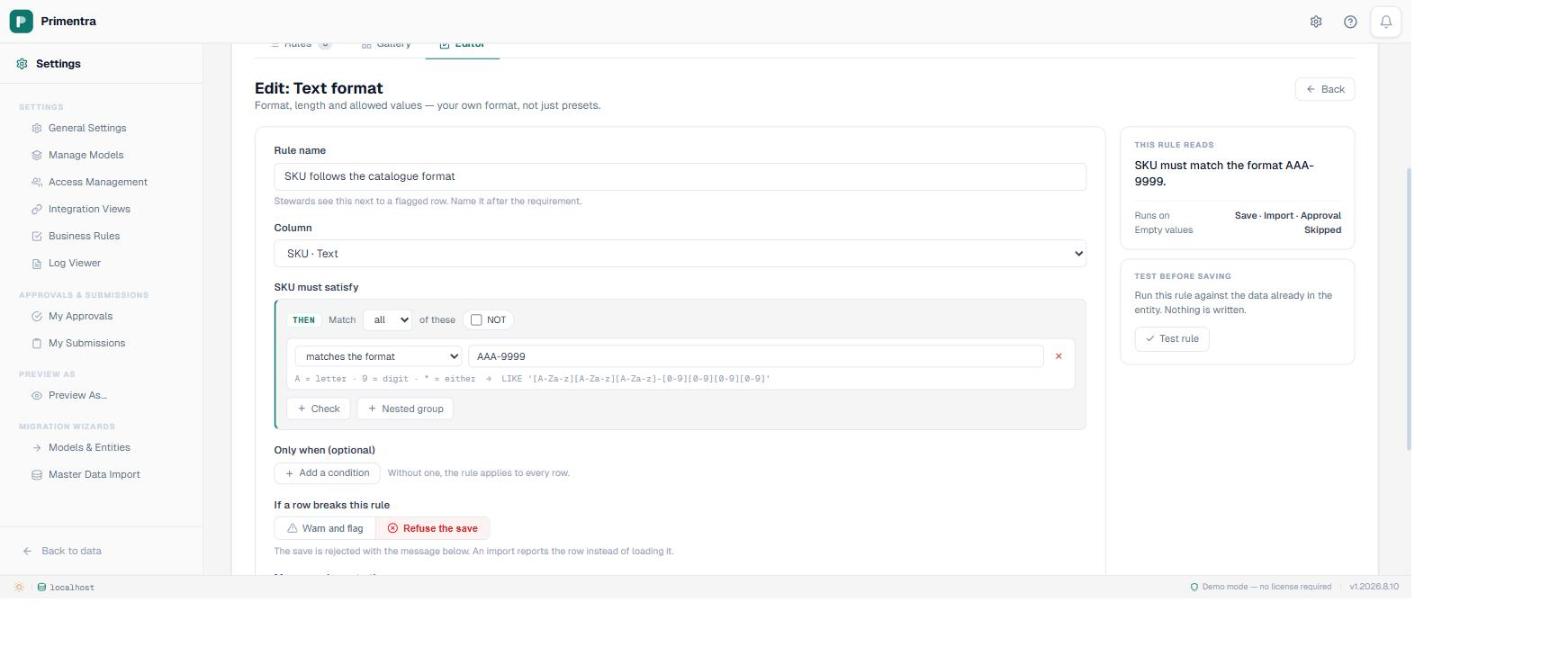
Compare the two ways of saying the same thing. A mask: AAA-9999. A regular expression: ^[A-Za-z]{3}-[0-9]{4}$. Both describe a SKU. Only one of them can be read by the person who has to live with the rule.
The whole syntax is three characters
A is a letter. 9 is a digit. * is either. Every other character in the mask is that character, including hyphens, slashes, dots and spaces. There is no quantifier syntax, no anchoring, no character classes, and no escaping to learn, because there is nothing to escape.
Note what A does not do: it does not mean uppercase. abc-1234 matches AAA-9999 quite happily. If you want the value in capitals, add the is uppercase check next to the mask in the same rule. Two checks in one group, both of which must hold. That surprised me the first time and it is the single most common mask mistake.
The real reason masks are the default
Readability is the argument you would expect a vendor to make, and it is true, but it is not the deciding one. The deciding one is that a mask compiles to a LIKE pattern, and SQL Server can evaluate LIKE.
You can see the compilation in the editor. Type AAA-9999 and the line underneath reads LIKE '[A-Za-z][A-Za-z][A-Za-z]-[0-9][0-9][0-9][0-9]'. Not a description of what will happen. The actual pattern, which the same rule uses in the database. Characters that mean something to LIKE — percent signs, underscores, square brackets — are bracket-escaped on the way through, so a mask containing them matches them literally instead of turning into a wildcard.
Because the check runs in the database, it runs everywhere the database runs: a grid save, a REST API write, a staging batch, an approval. That is the property you actually want from a format rule, and it is the property a regular expression cannot have here.
So what happened to the regex operator
It is gone, as of August 2026. SQL Server has no built-in regular expression engine, so when the evaluator met a regex leaf it passed the row rather than failing it — a rule the server cannot evaluate would otherwise reject every row in the table. Passing is the only safe direction to fail in, and that is exactly the problem: the check could never do anything but pass.
The label on it promised the pattern was checked in the browser and on the API. It was not — those checks were never written, so a pattern typed there was accepted, stored and ignored on every path. Rather than build a client-side check a feed would walk straight past anyway, the operator was withdrawn. A rule saved before then still passes every row, exactly as it always did, and the builder now says so in as many words.
I would rather ship that honestly than add CLR integration to every customer's SQL Server so a rule builder can offer one more operator. If you need a true regular expression enforced at the database, a computed column with a check constraint is the route, and it lives in your schema rather than in ours.
When one mask is not enough
Real catalogues have history. The SKUs issued before 2019 are eight characters, the ones after are nine, and nobody is going to renumber twenty thousand products to make a rule tidy. A mask on its own cannot express that, but a rule can, because the THEN side of a rule is a boolean tree rather than a single check.
Set the group to match any of these and put both masks in it. Now a value satisfying either one passes. Add a third for the format you are migrating towards and you have a rule that accepts the past and the present while rejecting typos in both. You can go further and wrap the old format in an IF condition on the launch date, so only products created before the cutover are allowed to use it — which is a conditional rule, and the point at which the format stops being a format and starts being policy.
One warning from experience: if you find yourself needing four alternative masks on one column, the column is probably holding two different things. That is a modelling problem and a rule will only paper over it.
Test it before you turn it on
A format rule is the one most likely to fail against data you already have, because formats drift quietly for years. Press Test rule in the editor and it evaluates the mask against every row in the entity and reports which ones would fail, without writing anything and without saving the rule. If the answer is four rows, fix them and set the rule to error. If the answer is nine hundred, set the rule to warning and work through the list first.
Remember that empty values are skipped. A mask says nothing about whether a value must be there, only about what it must look like if it is. If the column also has to be filled in, that is a separate check in the same rule. The guide to the engine covers how those combine, and why blank is never a failure by default.
Common questions
What is a format mask?
A pattern in the shape of the value it describes. A is a letter, 9 is a digit, * is either, and everything else is itself. AAA-9999 matches ABC-1234. It compiles to a SQL LIKE pattern, which is what runs against the data.
Does it support regular expressions?
No. SQL Server has no regex engine, so a regex leaf could only pass unexamined. The operator that existed until August 2026 did that silently and has been withdrawn; use a format mask, which the database enforces.
Which mask characters exist?
Three: A for a letter, 9 for a digit, * for either. Everything else is a literal, and characters that mean something to LIKE are escaped automatically.
What if a mask cannot express my format?
Put several checks in one group set to match any, so the value can satisfy either of two masks. A format that still will not fit usually means the column is holding two different things.
Write one mask and see how much of your catalogue breaks it
Type the format the way it looks, read the LIKE pattern it compiles to, then run it against the data you already have. Primentra runs on your own SQL Server, deploys in a day, and costs €7,500 per year flat, with a 60-day trial.