
You export the supplier list to Excel. You delete forty fax numbers that nobody has dialled in years, and you import the file with Overwrite. The import reports success. All forty fax numbers are still there.
Primentra worked like that until 15 October. A customer asked us to change it the day before. Version 1.2026.10.15 lets you choose per import, and it counts the values it will clear before it writes anything.
Why an empty cell means "no change"
An import file rarely carries every column. A buyer sends Code, Name and a new payment term. The other twenty columns are missing, or half filled, because the buyer only knew some of the answers.
Let an empty cell clear the field, and that file wipes out everything the buyer did not know. So most tools play safe. To them an empty cell says "I have nothing to tell you about this field", and the value stays.
Search for the problem and you land in HubSpot and ServiceNow community threads, and in old Microsoft Access ones, with users asking both ways. Some want the blank to clear. Others are glad it never does. Each of them is right about their own file.
The round trip breaks the default
Export, edit in Excel, import back. In that file an empty cell is a decision. You deleted the value on purpose.
A "no change" import ignores the decision and does not mention it. The result screen counts 800 rows updated, and you find the old fax number months later on a record you thought you had cleaned.
Until this version you had two ways out. You cleared each cell by hand in the grid, or you loaded the file through staging with the Overwrite All merge mode. A data steward with a spreadsheet wants neither.
One checkbox, off every time
Pick Overwrite in the Import dialog and a checkbox appears under it: Empty cells clear the existing value. Select it, and an empty cell in a mapped column empties that field on the matched record.
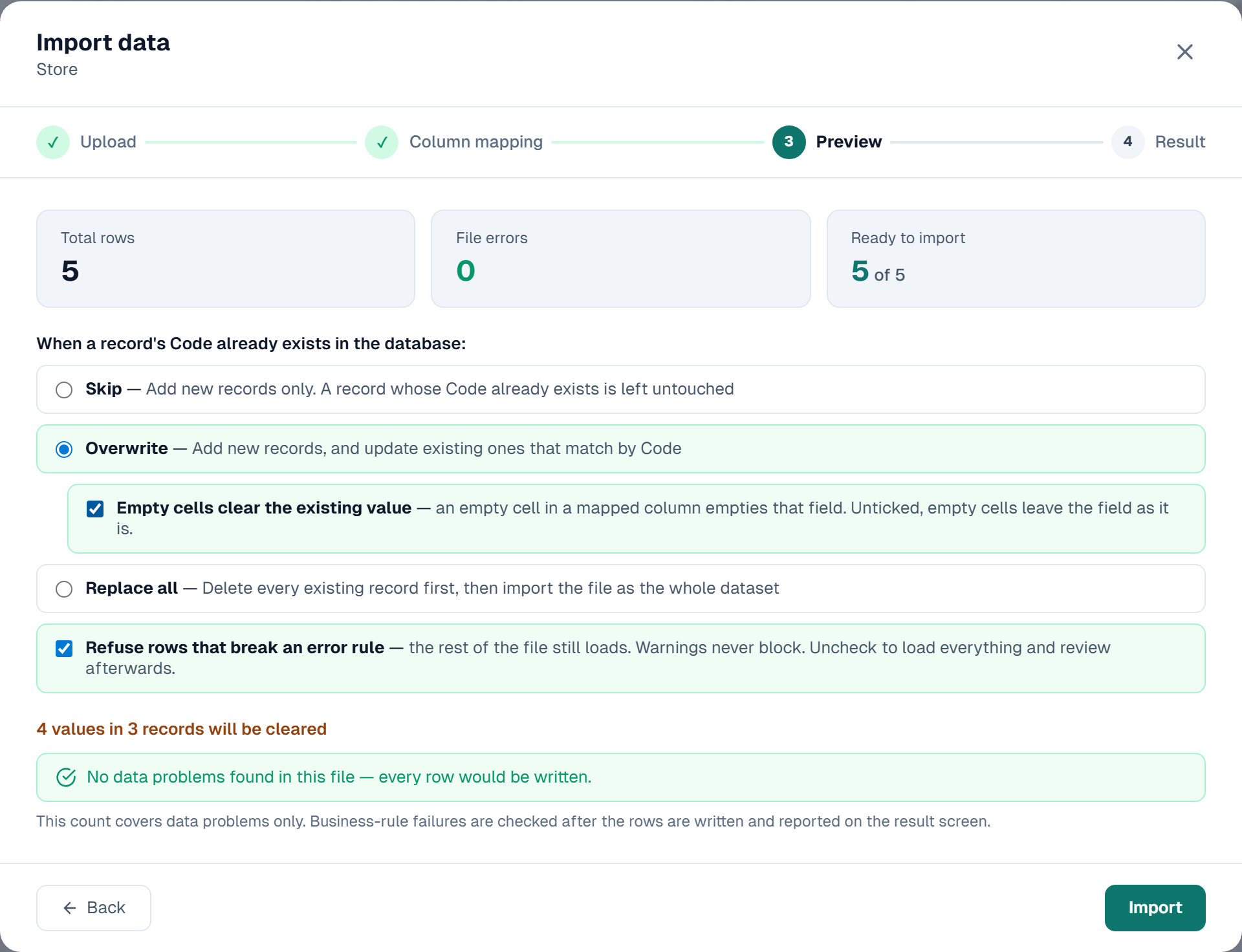
The box starts off at every import. We chose not to remember it. A destructive setting left on since last Tuesday is how a half-filled file empties a column.
Preview counts the damage first: 4 values in 3 records will be cleared. A cell that is already empty in the database does not count. After the import the Result step shows the same number, and the audit log line for the import ends with , 4 values cleared.
Read that count. If you expected 40 and Preview says 4,000, you mapped a column wrong. Click Back. Primentra has written nothing yet.
What a blank still cannot clear
Selecting the box leaves these alone:
- Columns that are not in the file, or that you set to skip. Only mapped columns clear.
- New records. An empty cell on a Code that does not exist yet writes nothing.
- Code. It is the key that matches a row in the file to a record.
- Name. An empty Name cell keeps the stored Name.
- Required columns. Primentra refuses the row with the reason
"Country" is required, so an empty cell cannot clear it. If you did not select Import the other rows anyway, the whole import stops and writes nothing.
Two other rules carry over from the rest of Primentra. A column you may read but not change refuses the clear, as it refuses any other write. And a business rule that sets a default fills the field again straight after the clear.
Two faults we caught in Chrome
We click through every feature in a browser before it ships. This one turned up two faults.
The first was ours. The checkbox sat below Replace all, so it read as an option of Replace all, the one choice that deletes every record first. It now sits indented under Overwrite.
The second was older. With Overwrite and an empty Name cell, every earlier version stored an empty Name. Nothing failed. The record lost its name in the grid and stayed that way. Version 1.2026.10.15 keeps the stored Name, with or without the checkbox.
Staging had this already
Loads from other systems go through staging, and staging has offered this choice per entity since March. Overwrite skips NULLs. Overwrite All writes them. Overwrite with Sentinel clears a field only when the source sends a marker such as ~NULL~. Our post on staging merge modes shows when each one fits.
A source system needs one rule per entity. A person with a file decides per file, so the Import dialog asks every time.
Ask your own tool
Evaluating an MDM tool, or checking the one you run? Ask what an empty cell does to an existing value on update. Then ask whether the tool tells you how many values it will clear before it clears them.
If the file also holds bad rows, partial import refuses only those rows and names the reason for each.
Common questions
Does Primentra remember the checkbox between imports?
No. It starts off every time, and it only shows when you pick Overwrite.
What happens to a column I did not map?
Nothing. Only mapped columns clear. A column you set to skip keeps its values too.
Can an import empty a required field?
No. Primentra refuses that row and names the column. To empty the field, switch Required off on the attribute first.
Do staging and the REST API use this checkbox?
No. Staging has its own merge modes, Overwrite All among them. The REST API and model import do not read the checkbox.
Upgrading to 1.2026.10.15? Make a backup first. This version changes the database.