
You spent three weeks in UAT. New entity, two renamed columns, a business rule, a role for the stewards who will own it. Now production needs all of it, and the usual answer is a checklist and an evening of clicking the same changes in again by hand.
We rebuilt the model import in Primentra 1.2026.9.29, released on 29 September 2026. The old import asked one question per entity (Overwrite, Merge or Skip) and showed you nothing of what would change. Worse, Merge deleted every column missing from the file, with its values. The new import shows every difference between the file and the server as its own line with a tick box, and it writes nothing until you click Import.
This post walks through a promotion from test to production with it: what goes into the file, what the preview shows, what starts unticked and why, and what you still have to do yourself.
What one export file can carry
On the test server, go to Settings → Models and click Export. You get a tree with a row per model, expandable to its entities. Everything is selected when the dialog opens. The structure always goes in; five switches, all off by default, add the rest. The Model Export / Import help page lists each option.
Model structure
Entities, attributes, data types, lengths, derived columns. Always in the file.
Data rows
Every record of the selected entities. Matched on Code, added or updated, never deleted.
Business rules
Matched by name. A rule whose columns do not exist on the other side comes in switched off.
Integration views
With their excluded columns and column snapshot. An import never removes a view.
Security
The roles with a permission on what you export, at their exact level. An explicit none stays none.
Users and approvers
The members of those roles and the entity approvers, matched by e-mail address.
Turning on Include users turns on Include security as well, since a user without roles means nothing on the other side. Derived columns carry their path as model, entity and attribute names, so they point at the right columns on a server where the internal IDs differ.
Three things never go into the file: passwords, API keys and API accounts. You make a new API key on each server. A key that works in test and in production is a key you cannot revoke in one place.
The preview: one line per difference
On production, click Import in the same place and drop the file. The import runs in three steps: Upload, Preview, Import. The preview only reads.
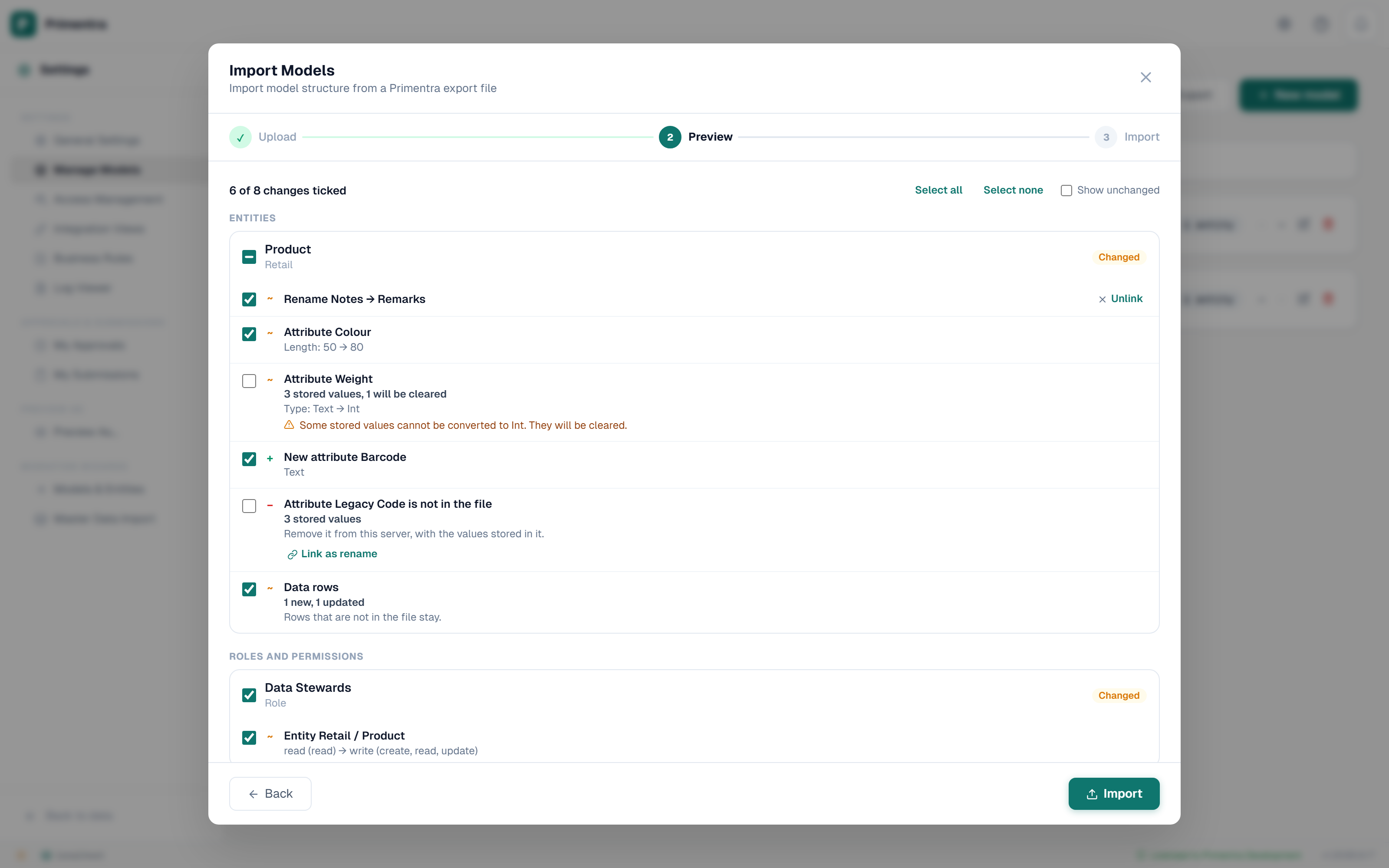
You get a card per entity, one for integration views, one per role, one for users and one for approvers. Each card says New, Changed, No changes or Only on this server. Inside a changed card, each difference is a line: a new attribute, a length from 50 to 100, a permission going from read to write. A line at the top names each section that has changes, with a count, and a click jumps there. With a big release the list runs long, so a fade at the bottom says there is more below.
New and changed lines start ticked. Four kinds start unticked, because a tick on them costs something you cannot get back:
A column, rule or derived column only in production
A tick removes it. For a column that means every value stored in it, and that cannot be undone.
A type change that would clear values
Text to Number, say, where "12 kg" cannot convert. The line tells you how many values would go.
A new user
A tick creates the account with no password. The user sets one at first sign-in.
Anything that grants administrator rights
You decide that one on purpose, line by line.
A type change converts the stored values the same way the entity form does. One that converts every value starts ticked. The Code and Name columns never show up for removal.
Renames keep their values
Primentra matches attributes by name. Rename Location to Site type in test, and production sees two lines: Location is not in the file, Site type is new. Tick both and you lose every Location value. Instead, click Link as rename on the first line and pick the new name. The two lines become one Rename line, and the column keeps its values under the new name. If the data type changed too, the line warns you, and the usual conversion applies.
Data rows: add and update, never delete
When the file carries rows, each entity gets one Data rows line with the number of new and updated rows. Rows match on Code, ignoring case. One tick covers every row of that entity; to leave some out, take them out of the file first. A row in the file overwrites the values it carries. A row only in production stays. An empty value in the file leaves the stored value alone.
So think before you tick it. If your test rows are "Supplier A" and "Test Corp", they have no business in production. If you do want to empty an entity before a load, use Replace all in Import from Excel & CSV. The model import will not do it.
Roles, permissions, users and approvers
Roles match by name. Each role card shows its permission lines, new, changed or only on this server, and each keeps its exact level. See Roles & Permissions for what the levels mean. A role that exists only in production keeps its members; its line removes its permissions on the objects in the file, and only if you tick it.
Users match by e-mail address. A new user gets no password and has to set one at first sign-in, through the welcome mail or Forgot password. The welcome mail is a separate tick box, off by default, so a dry run into a test copy mails nobody. For an existing user, a changed name and each role to join are ticked lines. An import never switches an account off or deletes it. Approvers match by entity and e-mail address, with their mail setting.
When you click Import
The import compares again. If a colleague changed production while you read the preview, a line that no longer fits does not apply, and the result lists it under Not applied with the reason. The same goes for a line that depends on one you left unticked, such as a Domain attribute pointing at a new entity you did not bring over.
If your ticks would leave the system without an active administrator, Primentra refuses the whole import and writes nothing. A row the database will not accept, such as one with a domain value that does not exist here, is refused on its own; the rest goes in, and Download all refused rows saves the list as an Excel file.
Every import writes one entry to the audit log per entity it changed, naming each line it applied, including columns removed with their data. Security changes and type changes get their own entries.
What stays behind
- API keys and API accounts. Make them again on production.
- A user you deleted in test is simply absent from the file, so the account in production stays. Delete it under Users.
- A user who is inactive in test is never created in production.
- An entity that exists only in production is never removed. Delete it under Settings → Models if you mean to.
- The import does not keep two servers in step on its own. Beyond the result screen and the audit log, it keeps no history of what came in when.
And the preview only knows about Primentra. It cannot tell you that a report somewhere still reads the column you just renamed. Before promotion day, list who reads the model and its integration views, and tell them what changes.
Questions
Can I promote one entity instead of the whole model?
Yes. Expand the model in the export tree and pick the entities you want. A file with only some entities of a model never offers to remove the others.
What if production has an entity that the file does not?
When the file holds a complete model, that entity shows as Only on this server, with its record count. You cannot tick it. To remove an entity, delete it under Settings > Models.
What happened to Overwrite, Merge and Skip?
The preview replaces them. The API still accepts the old body for existing scripts, and Merge now never deletes: on data rows it adds and updates only.
I use MDSModelDeploy today. Is this the same thing?
It fills the same role. The difference is the preview: you see each change, with its consequence, and pick it before anything is written. For moving off MDS itself, see the MDS migration docs.
Try a promotion between two of your own servers
Install Primentra on a test and a production SQL Server, export from one, and read the preview on the other. Nothing is written until you click Import.