
Six months into a SOC 2 review, the auditor asks a question that sounds simple: who has write access to the supplier bank account field right now? Not who changed it last quarter. That one is already answered, in the audit trail, in about five minutes. Who can change it, today. The room goes quiet. The honest answer means opening every role one at a time, checking which entities and attributes each one touches, cross-checking who belongs to which role, and writing the whole thing into a spreadsheet that goes stale the first time somebody's job changes.
That spreadsheet is the real cost of the question. Most reviews come back clean; the finding was never the risk. The risk is the week somebody spends building evidence a shared spreadsheet could not have kept current anyway.
Two different questions wearing the same word
We wrote about the backward-looking question already, in the audit trail nobody reads until something goes wrong and the auditor asks who changed that supplier record. Both cover the same shape of problem: something happened, and you need to trace it. A field-level log with old and new values, a user, a timestamp.
An access review is not that. Nothing has to go wrong for the question to be asked, and usually nothing has. SOX, ISO 27001 and most SOC 2 frameworks all call for a periodic entitlement review, on a schedule, independent of any incident: prove that access is still limited to the people who need it, not just that you would notice if it were misused. A system that only tells you what already happened cannot answer what is currently possible.
What the report actually shows
Primentra's Access Management screen has a Report tab that answers the same fact from three angles, because the useful question changes depending on who is asking it.
By user: pick a person and see every entity they can reach, with a CRUD badge combined across all their roles and a via [Role Name] label on each row naming which role is responsible. Expand an entity and attribute-level Read and Write badges appear too. That's where "Finance can edit the supplier record but not the bank account field" stops being a policy on paper and turns into a badge you can point to.
By entity: pick the supplier master itself and flip the question around. How many people have any access, how many have full CRUD, how many are read-only. It's a sortable table with a Source column naming whether the grant came from an entity permission, a model permission, or administrator rights.
By role: pick a role and see its member list next to what it grants. It's the fastest way to catch a role that picked up more rights than it was designed for.
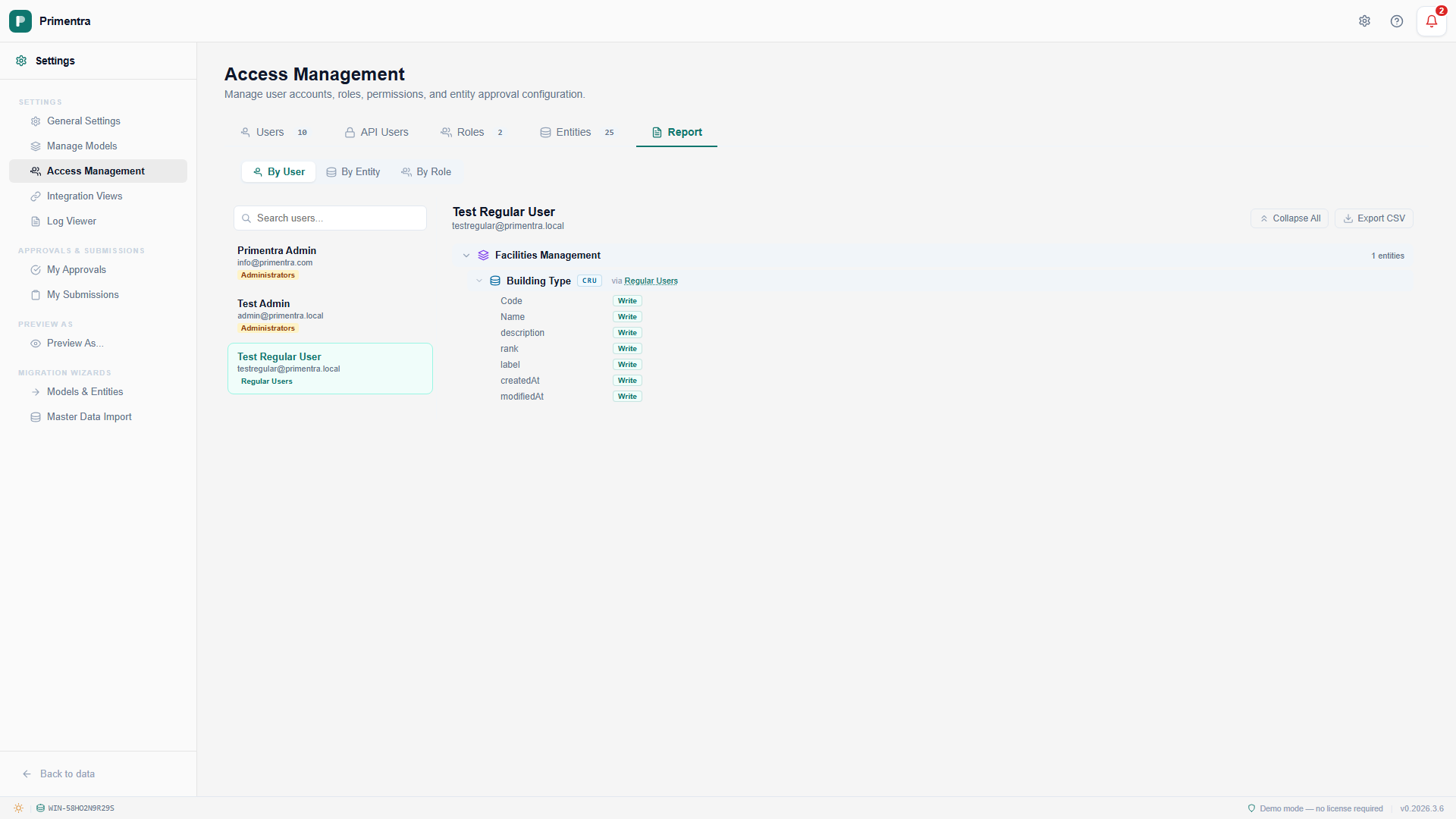
One detail only shows up once you go looking for it: an administrator's row does not come back blank. Administrators bypass the permission model entirely, so a report built only from role grants would show the most powerful account in the system as having none. That reads as no access instead of total access, exactly the kind of gap an auditor is trained to notice. The report instead marks every entity Yes across every right, sourced as Administrator — full access to everything. It exports to CSV, JSON or Excel alongside everyone else, ready to hand over as evidence instead of explained away in the meeting.
The badge is a claim. Don't take even our word for it.
A report that says Finance cannot see the bank account field is still just a report saying so. Anyone who has watched a permission model claim one thing and enforce another has a reason not to take a badge at face value, and they are right not to.
Preview As closes that gap. Pick the Finance role, start the preview, and the grid renders exactly as Finance sees it: read-only, with the bank account column not there at all, not greyed out, not hidden by CSS, absent from what the server sends to the browser in the first place. The report makes the claim. Preview As shows the enforcement. An auditor who asks for both gets a stronger answer than either alone, and neither one takes longer than a couple of clicks.
What it doesn't do
The report is a snapshot, not a timeline. It tells you what is true right now, not what was true in March before someone tightened a role, and not who approved widening it in the first place. Ask it "who could reach this a quarter ago" and it has nothing to say.
That history exists, just not here. Every saved change to a role is written to the audit log as its own entry, with the old and new permission recorded field by field. Pair the two and an access review gets both halves an auditor actually asks for: who can reach this today, from the report, and when that became true, from the log. Answering only one of those is answering half the question with the same confidence as the whole thing.
Common questions
Is a permissions report the same as an audit trail?
No. An audit trail is backward-looking: who changed this record, and when. A permissions report is forward-looking: who could change it right now, whether or not they ever have. An access review asks the second question, and a change log cannot answer it. We wrote about the first question on its own in the audit trail nobody reads until something goes wrong.
Does it show who changed a permission, or just who has it now?
Just who has it now: a snapshot of effective access at the moment you run it, not a timeline. Every saved change to a role is separately written to the audit log as a permission_change entry with the old and new value, so the history sits one report over.
How do I prove a role cannot see a field, not just claim it?
Show both. The report gives the claim: an attribute-level Read badge, or the absence of one. Preview As gives the proof: the grid rendered as that role sees it, with the field not there. An auditor trusts the second more than the first, and they are right to.
What does an administrator row look like in the report?
A row per entity marked Yes on every right, sourced as "Administrator — full access to everything." An administrator bypasses the permission model, so a report that only reads role grants would otherwise return a blank row for the one account that can do the most damage.
Run your own access review before the auditor does
The 60-day trial installs on your own SQL Server. Point it at your real roles and see what the Permissions Report says about them before someone else asks.